Google Maps
Google Maps Platform provides geocoding, place search, directions, distance, and elevation data. Willow makes these services available to agents through a built-in connector.
Authentication types
Google Maps supports two authentication methods in Willow:
- API Key: An admin saves one shared Google Maps Platform API key. Every user of the connector sends requests through the same Google Cloud project and quota.
- API Key Per User: Each user supplies their own Google Maps Platform API key when they connect. Requests are billed to and limited by that user's Google Cloud project.
Use a shared key when one team owns billing and quotas. Use per-user keys when users need separate projects, quotas, or billing.
Before you start
You will need:
- A Google Cloud project.
- A billing account linked to that project. Google Maps Platform requests fail when billing is not enabled.
- The Google Maps Platform APIs required by the Willow tools you plan to use.
- Permission to create and restrict API keys in the project.
An API key belongs to one Google Cloud project. Billing and every required API must be enabled in that same project.
Match Willow tools to Google APIs
Enable only the APIs required by the tools you plan to turn on.
| Willow tool | Google API to enable | Availability |
|---|---|---|
geocode | Geocoding API | Current |
reverse_geocode | Geocoding API | Current |
search_places | Places API (Legacy) | Legacy request format |
place_details | Places API (Legacy) | Legacy request format |
distance_matrix | Distance Matrix API (Legacy) | Legacy |
elevation | Maps Elevation API | Current |
directions | Directions API (Legacy) | Legacy |
Google moved Places API, Directions API, and Distance Matrix API to Legacy status for new projects on March 1, 2025. Their replacements use different hosts and request formats. Enabling Places API (New) or Routes API alone does not make Willow's current legacy-format tools compatible. See Google Maps Platform legacy products.
On September 20, 2026, all seven Willow tools returned successful Google provider responses in an end-to-end test using a saved shared API key. The test covered API-key forwarding and the corrected routes for reverse geocoding, place search, place details, and distance matrix.
Set up Google Cloud
1. Select or create a project
Open the Google Cloud Console, then select the project that will own the API key, billing, and quotas.
2. Link billing
Open Billing → Linked billing account and link an active billing account to the project.
Google Maps Platform uses pay-as-you-go pricing. Review the current pricing, then configure budgets, quota limits, and billing alerts before production use.
3. Enable the required APIs
Go to APIs & Services → Library and enable the APIs listed in Match Willow tools to Google APIs.
For a first geocoding test, enable Geocoding API. You do not need Maps JavaScript API for Willow's server-side geocoding tool.
4. Create an API key
- Go to APIs & Services → Credentials.
- Click Create credentials → API key.
- Copy the key and store it securely.
- Click Edit API key before using it in production.
5. Restrict the key
Under API restrictions, select Restrict key, then allow only the APIs used by your enabled Willow tools.
Willow sends these requests from its servers, so a browser referrer restriction is not suitable. Use an IP address restriction only if your Willow deployment has stable, documented egress IP addresses. Ask Willow support which application restriction is compatible with your deployment.
See Google Maps Platform API security best practices.
Configure Willow
- In Willow, go to Build → MCP Servers.
- Open Google Maps.
- Select Setup.
- Choose API Key for a shared admin-managed credential, or API Key Per User if each user will connect their own key.
- Enter the API key. For a shared key, you can also record an expiration date so Willow can remind you to rotate it.
- Click Save Changes.
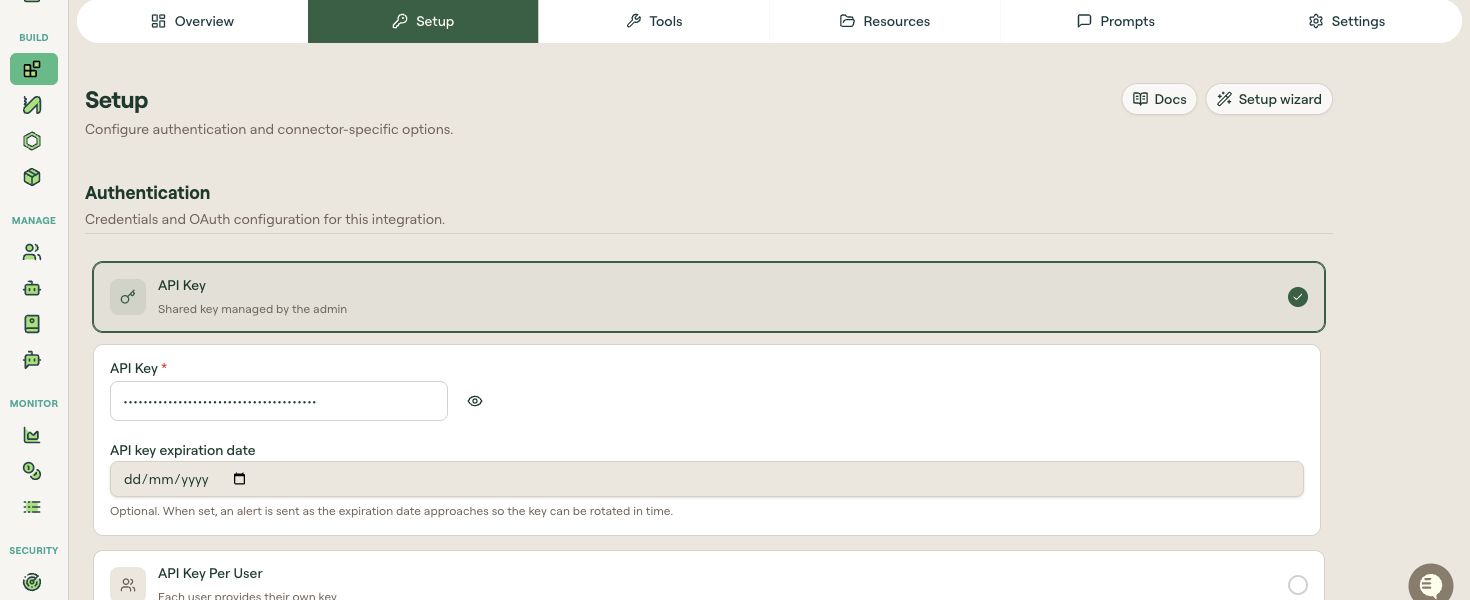
Treat an API key like a password. Do not add it to documentation, screenshots, source control, or support messages.
Choose tools
Open the Tools tab and enable only the tools your agents need. Fewer enabled tools make the agent's choices clearer and limit unnecessary API access and cost.
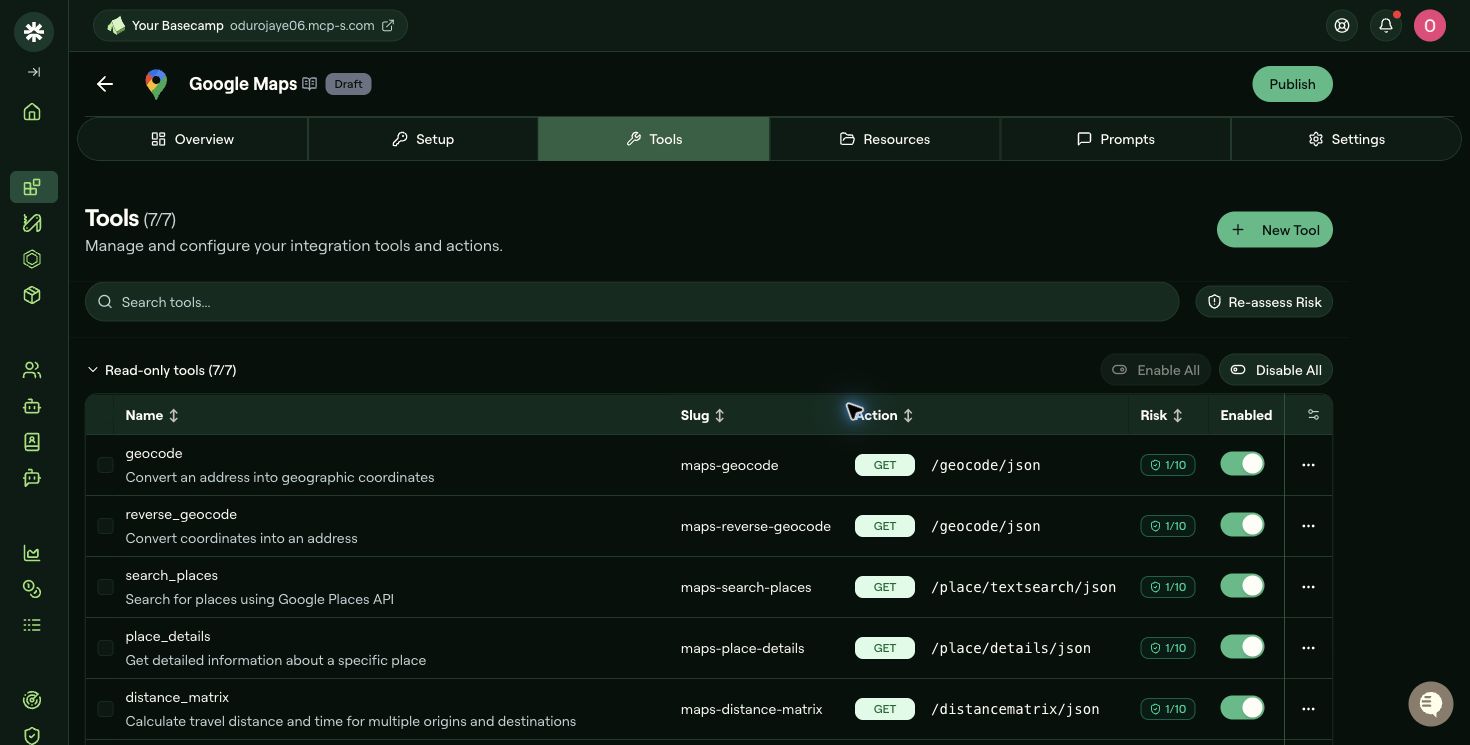
The connector contains seven read-only tools. The configuration shown above has all seven enabled for end-to-end testing. For production, enable only the tools your agents need.
Test the connection
Start with geocode because it needs only the Geocoding API.
-
On the Tools tab, open the menu for
geocode. -
Select Test Tool.
-
Enter:
{"address": "Eiffel Tower, Paris"} -
Click Run test.
A successful response has a top-level status of OK and includes one or more results with geometry.location coordinates.
After geocode succeeds, test every other tool you plan to enable with representative input. A successful test confirms both the Willow route and the corresponding Google API configuration; it does not prove that other APIs are enabled or that future requests will remain within quota.
If the test fails, compare its message with a direct Google Geocoding API request made from a secure terminal or API client. Never paste the key into shell history, logs, or a support ticket. A project-specific response such as "API is not activated" proves Google received the key; a missing-key response means the request did not include it.
Troubleshooting
"You must use an API key to authenticate each request"
Google did not receive a key.
- Reopen Willow's Setup tab.
- Confirm the intended authentication method is selected.
- Enter the key again and click Save Changes.
- Rerun the tool test.
If the message persists while a direct request with the same key reaches the correct project, send Willow support the integration name, authentication type, tool slug, timestamp, and complete error message. Do not send the API key.
"This API is not activated on your API project"
The key is valid, but the requested API is disabled in the key's project. Open APIs & Services → Enabled APIs & services, confirm the project name, and enable the API mapped to the tool in this guide.
Billing is not enabled
Open Billing → Linked billing account in the key's project and link an active billing account. Wait a few minutes, then rerun the test.
"REQUEST_DENIED" after restricting the key
Check both types of restrictions:
- The required service must be allowed under API restrictions.
- The application restriction must permit requests from Willow's server-side environment.
A Places, directions, or distance-matrix tool fails
Check whether Google allows the corresponding legacy API in your project. New projects cannot enable several legacy services. If only Places API (New) or Routes API is available, contact Willow support about a connector version that uses the replacement API and request format.
ZERO_RESULTS
The request succeeded, but Google found no match. Try a complete address with city, region, and country, or verify the latitude and longitude used for reverse geocoding.
Security and cost controls
- Use a dedicated key for Willow instead of reusing a browser or mobile-app key.
- Apply API restrictions to every production key.
- Rotate exposed or unrestricted keys.
- Enable only the Willow tools and Google APIs you need.
- Set quotas, budgets, and billing alerts in Google Cloud.
- Review usage by API and credential so unexpected traffic is easier to trace.