Set Up Client-Credentials Auth for a Machine User with Okta
Client credentials let a machine user reach an internal MCP server that uses Proxy Passthrough. Because a machine user has no interactive login, Willow mints an OAuth token from your identity provider using the machine user's client credentials and forwards that token to the MCP server on each call.
This tutorial walks through the full setup with Okta. Keycloak works the same way; see the note at the end.
By the end, you will have:
- an Okta API Services app that issues client-credentials tokens
- client credentials enabled for machine users in Willow
- a machine user configured with those credentials
- an internal MCP server set to Proxy Passthrough that receives the minted token
Prerequisites
You need:
- admin access to Willow, with Okta already configured as your SSO provider (see Configure Okta)
- an Okta org with API Access Management (available on the free Okta Integrator Free Plan and on paid Workforce Identity orgs)
- Okta admin access to create applications and authorization servers
- a machine user and an internal MCP server you can point at Willow
Part 1: Configure Okta
Create an API Services application
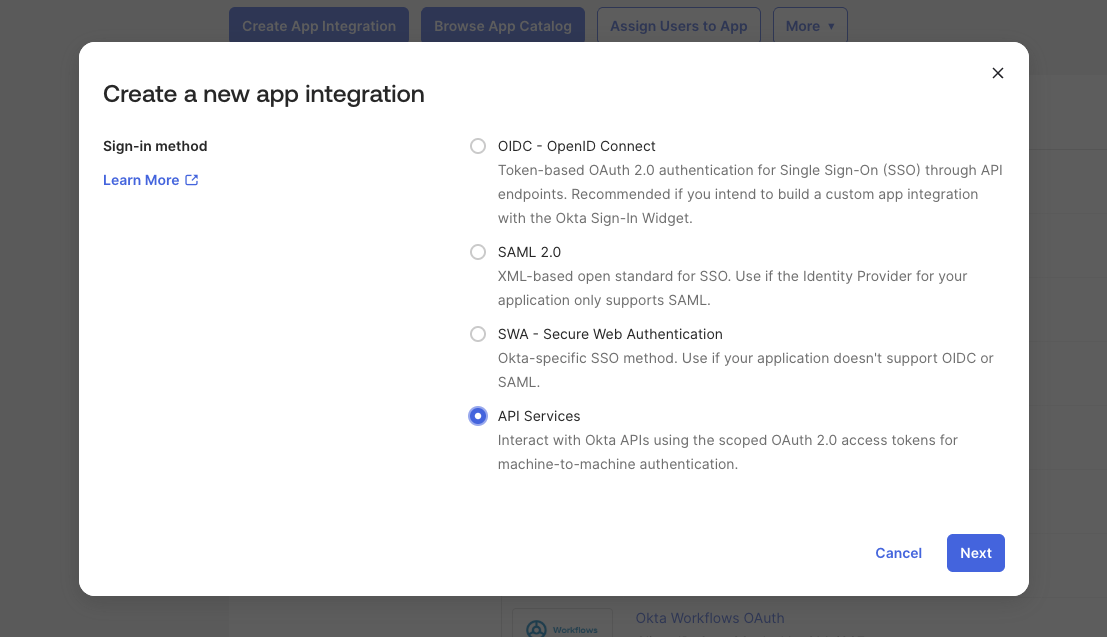
- In the Okta Admin Console, go to Applications > Applications and select Create App Integration.
- Select API Services and select Next.
- Enter a name (for example, "Willow Machine User") and select Save.
- On the app's General tab, under Client Secrets, select Generate new secret. A new API Services app has no secret until you generate one. Copy the secret now, because Okta only shows it once.
- Still on the General tab, edit General Settings and clear Require Demonstrating Proof of Possession (DPoP) header in token requests, then select Save.
Okta enables DPoP by default on API Services apps. A standard client-credentials grant fails with invalid_dpop_proof while it is enabled, so you must turn it off.
Add a scope and access policy
- Go to Security > API and open the default authorization server.
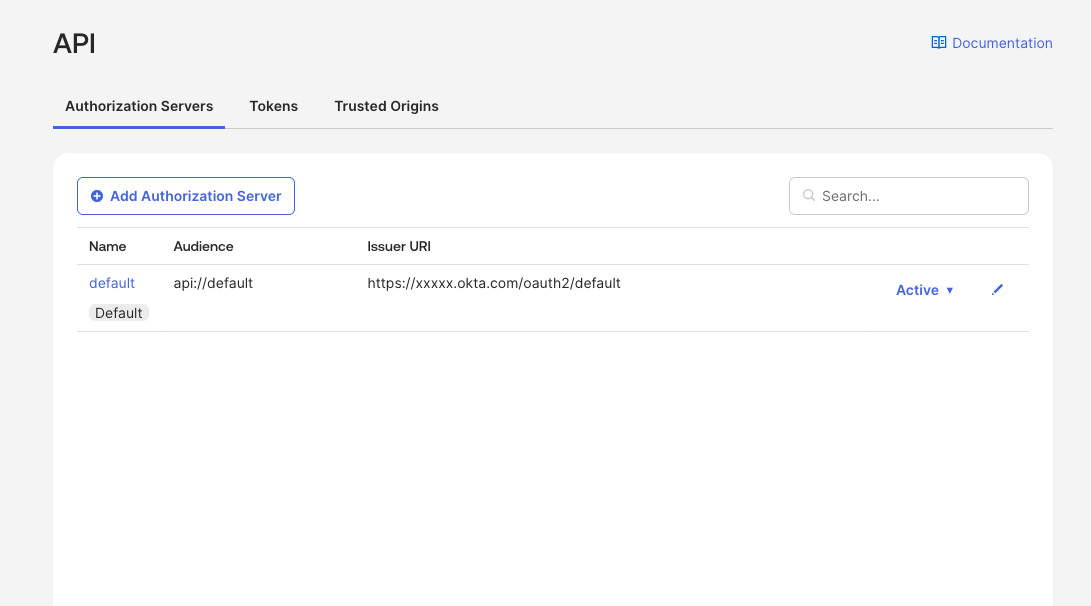
If you do not see an Authorization Servers tab, API Access Management is not enabled in your Okta org. Use an Integrator Free Plan org or a paid Workforce Identity org, or contact Okta to enable this feature.
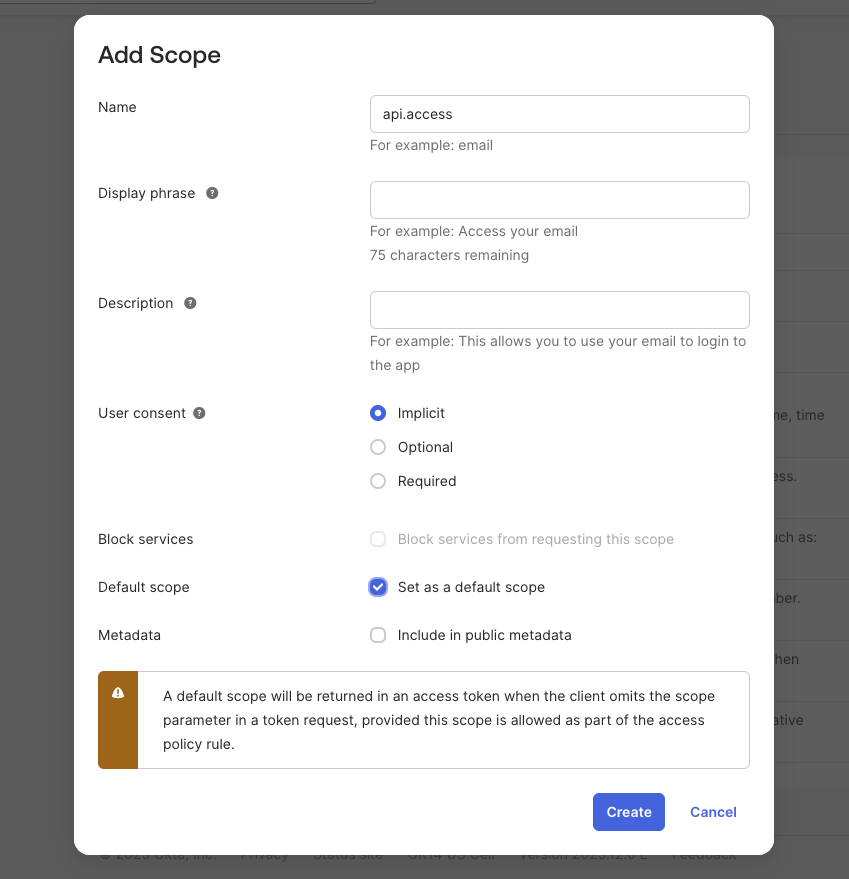
- On the Scopes tab, select Add Scope. Name it
api.access, and check Set as a default scope. Select Create.
- On the Access Policies tab, select Add Policy. Name it "Client Credentials Policy", assign it to All clients, and select Create Policy.
- Inside the policy, select Add Rule. Name it, check Client Credentials under grant type, and select Create Rule.
Copy the Client ID from the app's General tab. Your Token Endpoint is https://{your-okta-domain}/oauth2/default/v1/token.
Part 2: Enable client credentials in Willow
- Open Admin > Settings > Authentication Settings and select Edit on SSO Provider. With Okta selected as Provider, select Enable Client Credentials for Machine Users.
- A Token Endpoint field appears. Set it to your custom authorization server's token endpoint,
https://{your-okta-domain}/oauth2/default/v1/token(where theapi.accessscope lives). This is not the same as your SSO issuer, which is the org authorization server, so the auto-discovered value can point at the wrong server. Select Save.
Part 3: Configure the machine user
- Open Manage > Users > Machine Users. In the Client Credentials column, your machine user shows Not configured. Select it to open the Client Credentials dialog.
- Enter the Client ID and Client Secret from your Okta API Services app, and set Token URL to
https://{your-okta-domain}/oauth2/default/v1/token. Leave it blank only when the organization Token Endpoint from Part 2 already points there. If a machine user's Token URL resolves to the org authorization server, the grant fails with "Failed to generate access token". - Select Save.
The Client Credentials column now shows the configured Client ID.
Part 4: Point an internal MCP server at Proxy Passthrough
- Open your internal MCP server and go to its Setup tab.
- Set the authentication mode to Proxy Passthrough.
- Select Save Changes, and make sure the machine user's group has this server assigned.
Now, when the machine user calls a tool on this server, Willow requests a token from Okta using the machine user's client credentials and forwards it as the Authorization header. The MCP server receives a bearer token issued by Okta, with cid matching your API Services app and the api.access scope.
Verify it worked
- The machine user's Client Credentials column shows the Client ID, not "Not configured".
- A tool call from the machine user to the Proxy Passthrough server succeeds.
- The MCP server receives an
Authorization: Bearer <token>whose issuer is your Okta domain. - If the machine user has no client credentials configured, the call fails with "Failed to generate access token... Please reauthorize."
Troubleshooting
"Feature not enabled" API Access Management is not enabled in your Okta org. Use an Integrator Free Plan org or a paid Workforce Identity org, or contact Okta support.
"Invalid scope" Create a scope in your authorization server, and either set it as a default scope or request it explicitly.
"Policy evaluation failed" Your access policy has no rule allowing the Client Credentials grant type. Add one as described in Add a scope and access policy.
"Invalid client" The Client ID or Client Secret does not match the API Services app in Okta. Confirm both, and regenerate the secret if you no longer have the copied value.
"invalid_dpop_proof" DPoP is still enabled on the API Services app. Clear Require Demonstrating Proof of Possession (DPoP) header in token requests in the app's General Settings.
"Failed to generate access token"
The Token URL points to the SSO authorization server. Client credentials need the custom authorization server that hosts your scope. Set it to https://{your-okta-domain}/oauth2/default/v1/token in Part 2, Part 3, or both.
Using Keycloak instead
Keycloak works identically. Create a realm and a client with service accounts (client credentials) enabled, and use its token endpoint (https://{keycloak-host}/realms/{realm}/protocol/openid-connect/token) as the Token URL. Everything else, including the machine user configuration and Proxy Passthrough, is the same.
Next steps
- Make Your First Gateway Call with a Machine User
- Build an MCP Server Behind Willow to validate the forwarded token
- Machine Users for the full reference