Roles
The Roles page controls what each admin user can see and do through fine-grained permission scopes. Open it by selecting Manage Roles on the Admin Users page.
Roles fall into two kinds: predefined roles that every organization ships with, and custom roles you build for your own needs.
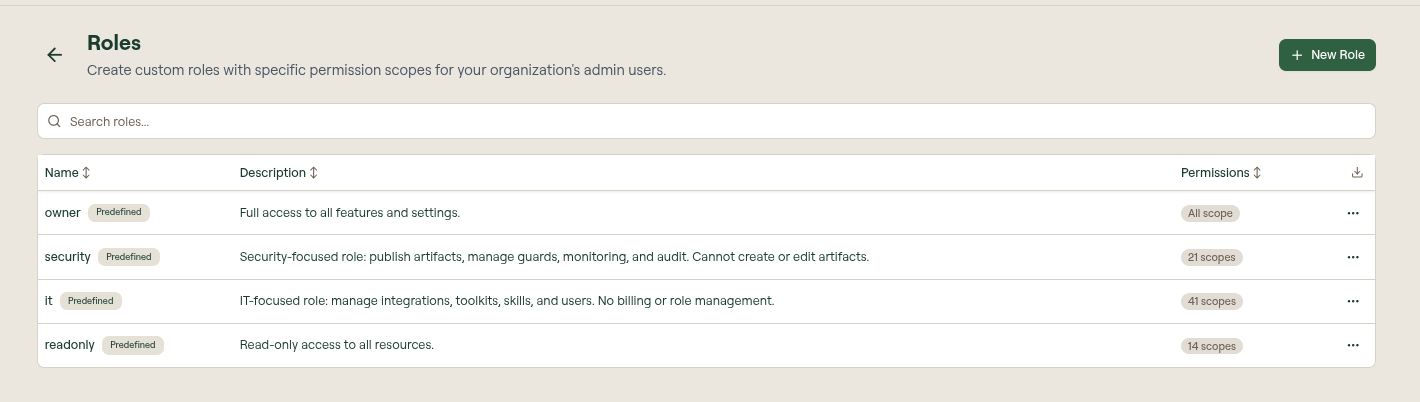
Built-in role templates
The following predefined roles are available in every organization. They are marked Predefined and cannot be modified.
| Role | Description |
|---|---|
| owner | Full access to all features and settings. |
| security | Security-focused role: publish artifacts; manage guards, monitoring, and audit. Cannot create or edit artifacts. |
| it | IT-focused role: manage integrations, toolkits, skills, and users. No billing or role management. |
| readonly | Read-only access to all resources. |
Permission scopes
When creating a custom role, you select permissions from the following categories. Each category exposes its own set of actions.
| Category | Available actions |
|---|---|
| Integrations (MCPs) | View, Create, Edit, Delete, Publish |
| Toolkits | View, Create, Edit, Delete, Publish |
| Skills | View, Create, Edit, Delete, Publish |
| Commands | View, Create, Edit, Delete |
| Rules | View, Create, Edit, Delete |
| Hooks | View, Create, Edit, Delete |
| Plugins | View, Create, Edit, Delete |
| Guards | View, Create, Edit, Delete |
| End Users | View, Invite, Edit, Delete |
| Admin Users | View, Invite, Edit, Delete, Manage Roles |
| Organization | View Settings, Edit Settings, Billing |
| Groups | View, Create, Edit, Delete |
| Monitoring & Shadow AI | View, Manage |
| Audit | View Logs |
| Vibe Apps | View, Create, Edit, Delete |
| Background Agents | View, Create, Edit, Delete |
The Manage Roles permission (under Admin Users) is required to create, edit, or delete custom roles and to change another admin's role assignment.
Separating building from publishing
Publish is what exposes an artifact to end users, so it is enforced separately from Edit. Granting Create and Edit without Publish produces a builder role: the admin can do all the work of assembling an MCP, toolkit, or skill, but cannot make it reachable by users.
For MCPs, Publish covers every action that changes what users can reach — but only once the MCP is live. A draft MCP is reachable by nobody, so while it is a draft its switches belong to Edit: a builder can enable and disable individual tools, use Enable All and Disable All, and turn the MCP itself off and back on. Publishing is the moment those choices start to matter, and from then on Publish covers:
- Publishing a draft MCP, and unpublishing a published one
- Publishing pending draft changes on a published MCP
- Enabling or disabling a published MCP as a whole
- Enabling or disabling individual tools on a published MCP, including the bulk Enable All and Disable All actions
- Approving a user-created MCP, and promoting one to the organization
Everything else stays with Edit: editing tool descriptions, slugs and schemas, adding or removing tools (on a published MCP new tools start disabled), changing approval requirements and conditions, and discarding draft changes.
For toolkits and skills, publishing and unpublishing are the only actions that change what users can reach, so those are what Publish covers — along with approving a skill that was held for review. Rejecting a held skill only keeps it out of the portal, so it stays with Edit.
To set up a builder-and-approver split, give the builder role Create, Edit and Delete without Publish, and give the approving role — the predefined security role, or a custom one — the matching Publish permissions.
Create a custom role
- Select New Role.
- Enter a name (for example, Developer or Viewer) and an optional description.
- Select the permission scopes this role should have.
- Select Create.
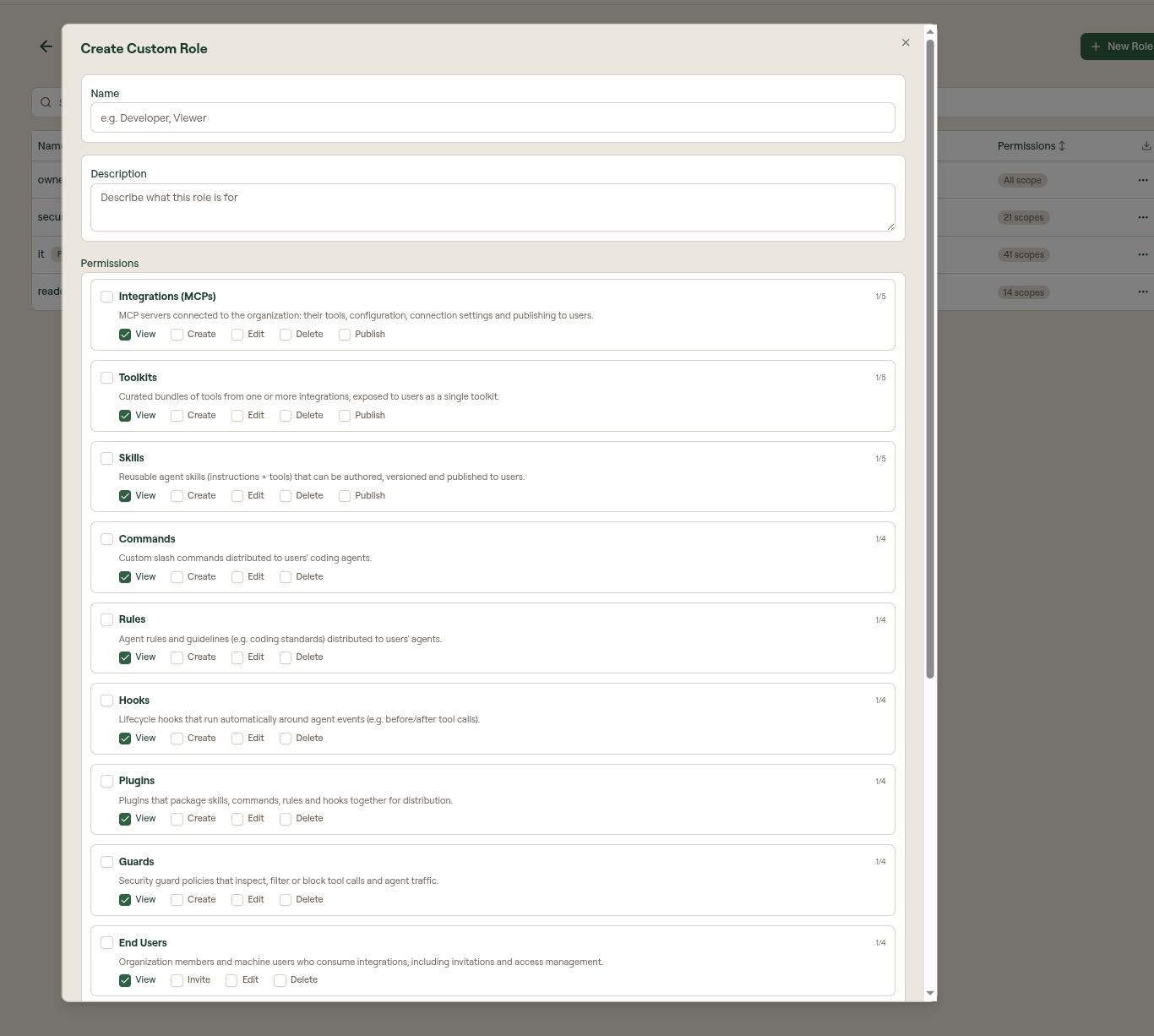
New custom roles appear in the role selector when inviting or editing an admin user.
Edit or delete a role
Select a custom role in the list to edit its name, description, or scopes. Deleting a role does not remove admin users who hold it; they fall back to no custom role assignment.
What to do next
- Admin Users: invite admins and assign these roles.