Radar
Open Control > Radar to review AI security risks across Identity & Access, Shadow AI, Data Exposure, Agents & MCP, and Monitoring & Incidents.
Posture by category
The five-axis chart shows category scores, a dashed target ring, and an overall score and rating. Select a chart axis or a card under Categories to open that category. Each card shows its score, risks off target, and unmeasured risks.
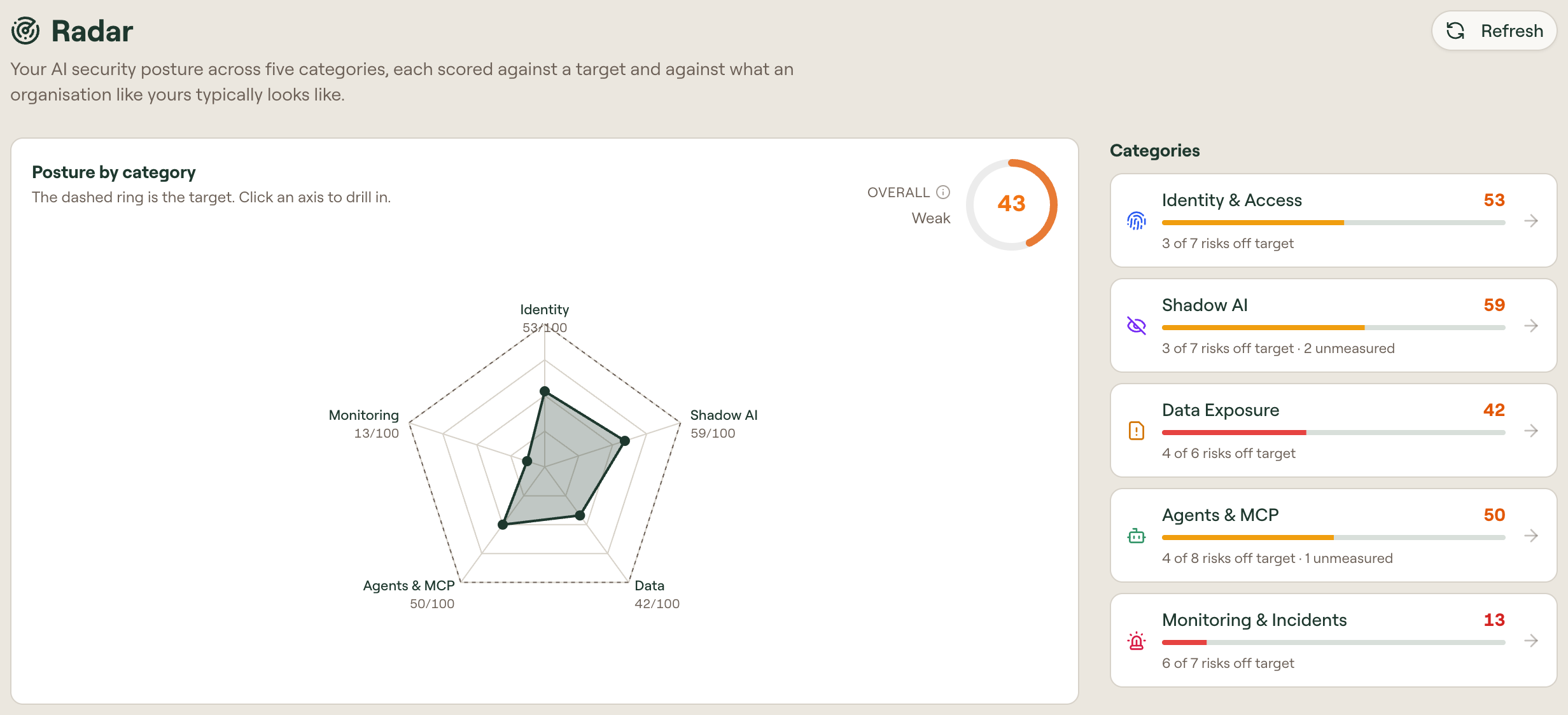
Below the chart, Risks lists findings and the items they affect. Use Group by to organize the list by Severity or Category. Select Refresh to recalculate the results.
How the score works
| Level | Calculation |
|---|---|
| Risk | A score from 0 to 100 based on progress from the typical value to the target. Reaching the target scores 100; the typical value scores 0. |
| Category | The weighted average of its measured risks. |
| Overall | The average of the five category scores. |
Unmeasured risks are excluded from category scores. Connect the required Scan Agent, browser extension, or activity source to provide their data.
Read a risk row
A category page shows its Category score and counts for Off target, On target, and Unmeasured. The list below has Risk and Items columns.

Each row includes a risk name, severity, description, examples of counted items, and framework links. Items shows the affected count. Two labels can qualify a finding:
- approximate: the result uses an estimate.
- Partial coverage: the result covers reporting devices. See Shadow AI to find devices without the Scan Agent.
Work a risk
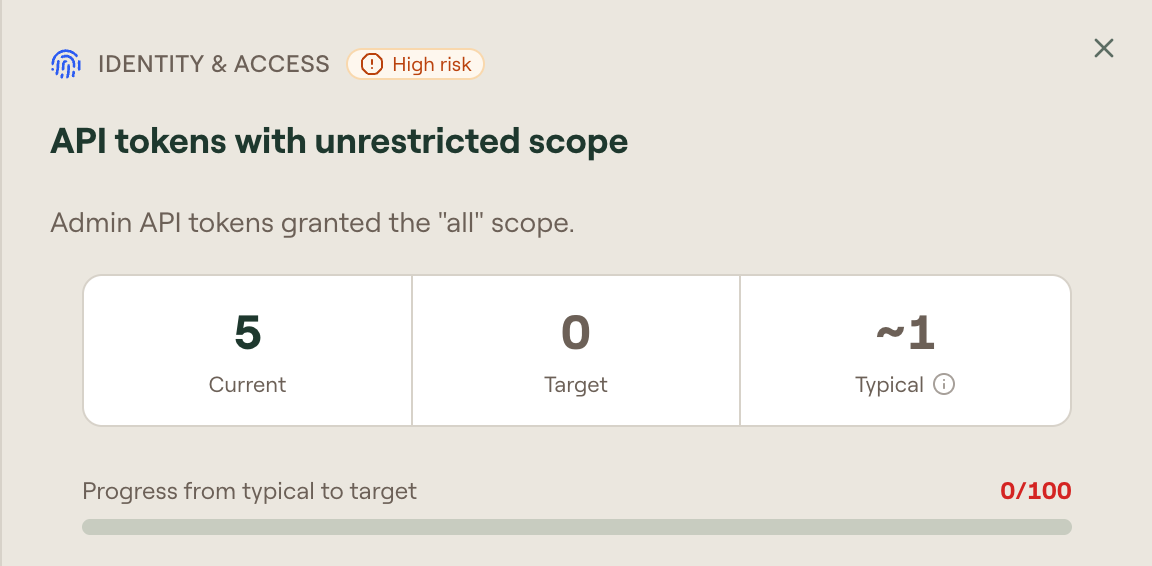
Select a row to open its details:
| Section | Contents |
|---|---|
| Current, Target, Typical | The measured value, desired value, and baseline used to calculate progress. |
| Progress from typical to target | The risk's score out of 100. |
| Why it matters | The security issue the finding describes. |
| How to improve it | Remediation steps, a link to the relevant Willow controls, and Docs. |
| Framework mapping | Links to the controls associated with the risk. |
| What is counted | The full list of affected items. Full screen expands the list. |
Compliance frameworks
Risks map to controls in the following frameworks. The tags on each row link out to the source.
| Framework | Used for |
|---|---|
| NIST CSF | Access control, detection, and response. |
| NIST AI RMF | AI inventory, governance, and measurement. |
| NIST GenAI Profile | Generative-AI data privacy. |
| OWASP LLM | The LLM Top 10 — prompt injection, sensitive information disclosure, excessive agency, supply chain. |
| OWASP NHI | Non-human identity risks — overprivileged credentials, secret leakage, long-lived secrets. |
| OWASP AST10 | Agent skill risks — malicious skills, over-privileged skills, update drift, untrusted external instructions. |
| MITRE ATLAS | Adversarial techniques against AI systems. |
| MCP Spec | Risks named in the Model Context Protocol (MCP) specification: tool poisoning, where a tool description manipulates the agent, and the confused deputy problem, where an attacker uses a trusted component's permissions to act on its behalf. |
| EU AI Act | Human oversight, deployer obligations, log keeping, serious incident reporting. |
| ISO 42001 | AI management system controls. |
| ISO 27001 | Information security controls. |
| SANS | Access control, monitoring, and inference security guidance. |
| Gartner TRiSM | AI trust, risk, and security management layers. |
A Practitioner tag identifies a risk based on industry practice.
Categories
| Category | Covers |
|---|---|
| Identity & Access | How AI tools and agents authenticate, who owns them, and whether their credentials are short-lived and scoped. |
| Shadow AI | AI tools, MCP servers, and accounts used without approval, and how much of your AI traffic Willow can see. |
| Data Exposure | Secrets, personal data, and source code reaching AI tools, and whether anything inspects prompts and responses. |
| Agents & MCP | Background-agent permissions, tool usage, and approval requirements. |
| Monitoring & Incidents | Whether your AI activity reaches your SIEM (security information and event management system), how long you keep the logs, and how quickly your team reviews alerts. |
Identity & Access
Radar KPIs for how AI tools and agents authenticate, who owns them, and whether their credentials are short-lived and scoped.
Shadow AI
Radar KPIs for AI tools, MCP servers, skills, and accounts in use without approval, and how much of that traffic you can see.
Data Exposure
Radar KPIs for secrets, personal data, and source code reaching AI tools, and whether anything inspects prompts and responses.
Agents & MCP
Radar KPIs for what autonomous agents are allowed to do, how much of that permission they use, and who approves the dangerous parts.
Monitoring & Incidents
Radar KPIs for whether AI activity reaches your SIEM, how long you keep the logs, and how quickly your team reviews alerts.