The Object Model
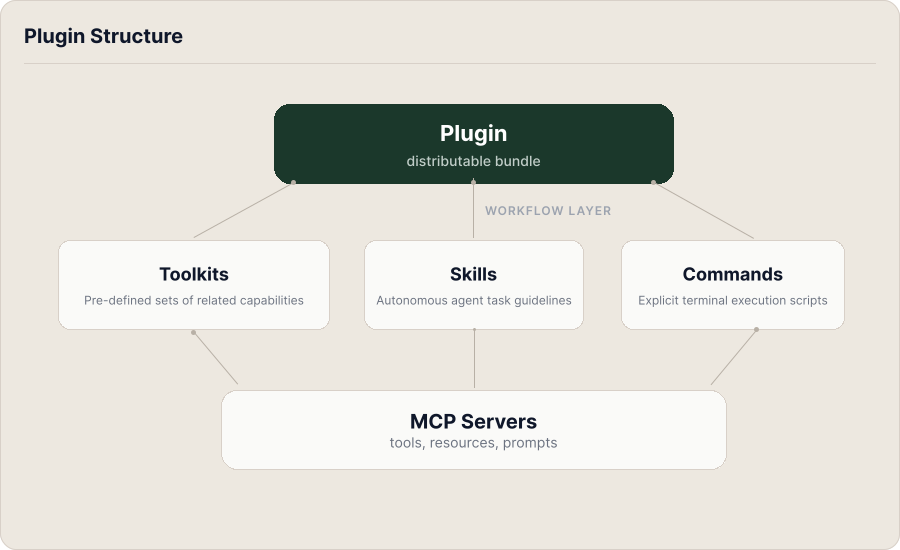
Willow has five types of objects. Admins create and configure them; end users encounter what they produce: the tools available in their AI client, the skills that appear in their agent's context, the commands they can invoke. The objects are layered. Each one builds on the layer below it, and the layer above it solves a problem the lower one leaves open.
MCP Servers
An MCP server is a registered connection to an external tool or service: GitHub, Slack, a database, a custom internal API, or any other service that implements the Model Context Protocol. MCP servers expose tools (actions an AI can take), resources (data it can read), and prompts (structured templates).
MCP servers are the foundation of the model. Everything else is built on top of them. Admins add and configure MCP servers; they carry no built-in opinion about who should access them or which of their tools are appropriate for which workflows. That's handled by the objects above.
Toolkits
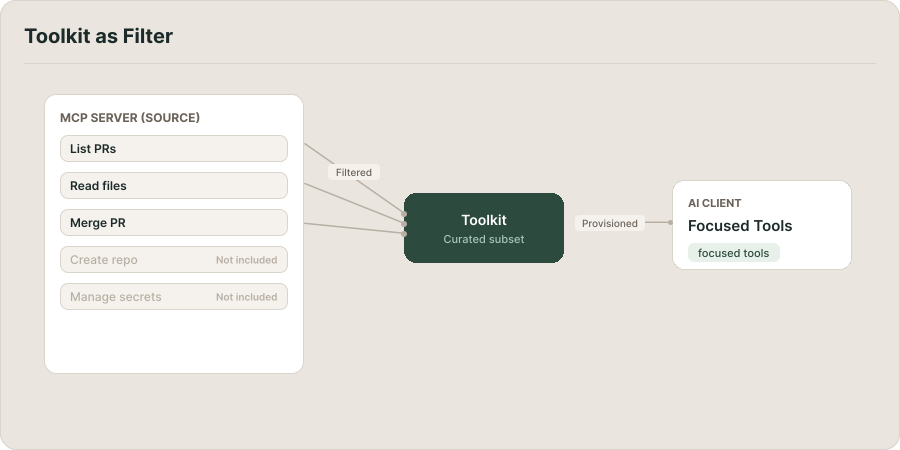
A toolkit is a curated selection of tools, prompts, and resources drawn from one or more MCP servers, packaged under a single name.
An MCP server might expose hundreds of tools across many different use cases. A toolkit selects the subset relevant to a specific workflow or team. A "GitHub Pull Requests" toolkit might include tools for listing PRs, reading details, posting review comments, and merging, and nothing else. Admins create org-scoped toolkits to give teams a focused, minimal-footprint interface to a server's capabilities, rather than exposing everything the server can do. End users see toolkits appear in their AI client automatically when they're assigned through a group.
The Least Privilege toggle makes this explicit: when enabled, a toolkit is strictly limited to its declared tools, even if the user's group grants broader access to the underlying server.
Toolkits can be user-scoped (created by an individual, visible only to their AI client) or org-scoped, available to a group or the whole organization.
Skills and Commands
Tools let an AI agent take actions. Skills give it the knowledge to take those actions well.
A skill is a markdown file that provides an agent with instructions, context, or domain knowledge: the schema of a database, the conventions a team uses, the workflow to follow for a particular task. Skills don't call APIs; they shape how the agent reasons before it acts. Admins publish org-scoped skills and assign them to groups; when an end user connects their AI client, skills assigned to their groups are injected into the agent's context automatically.
Commands are the active counterpart. A command is a named, parameterized workflow: a sequence the agent executes when invoked, typically as a slash command. A command might retrieve a support ticket, summarize it, cross-reference linked documentation, and draft a reply. Commands are how repeatable, multi-step workflows get encoded in a form an agent can run on demand. Admins define commands at the org level; end users invoke them.
Plugins
A plugin is a distributable bundle. It packages any combination of toolkits, skills, commands, MCP servers, rules, hooks, and sub-agents so they can be installed as a single unit.
Plugins solve the distribution problem. Without them, giving a team a curated set of tools and skills means configuring each component individually for each user. With a plugin, everything is bundled, published once, and installed in one action into a user's AI client (Cursor, Claude Desktop, or any supported tool). Once installed, all of the plugin's contents become available automatically. Admins control what's in a plugin and how it's distributed; end users install it and gain everything it contains.
Plugins can be published to the Willow marketplace or distributed directly to specific organizations or AI client types, and can be versioned and updated centrally.
- Admins: ready to start building? Begin with MCP Servers or the Add and Configure Your First MCP Server tutorial.
- End users: the tools, skills, and commands available in your AI client come from these objects. If something's missing, your admin can help.