What is Willow?
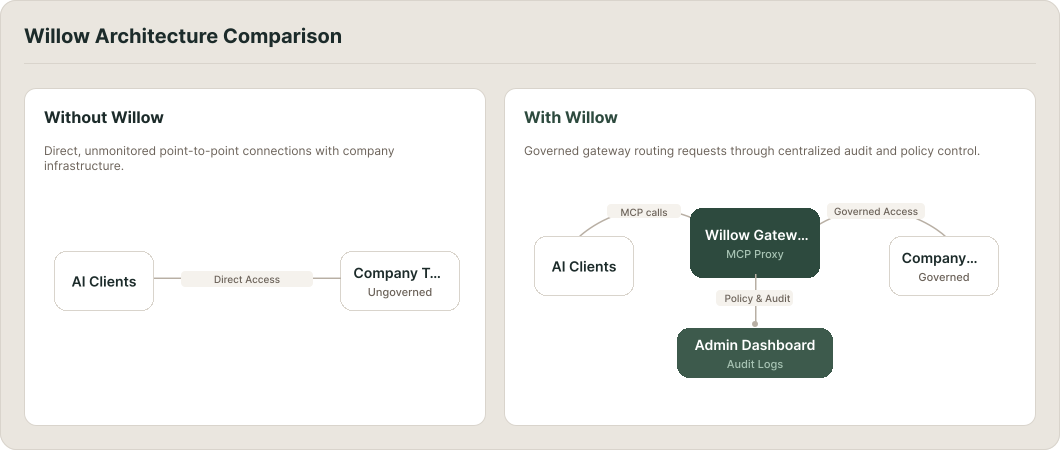
Willow is an enterprise AI governance platform. It sits between AI clients (Cursor, Claude Desktop, or any MCP-compatible tool) and the company tools those clients can access. Every tool call an AI agent makes passes through Willow first, where access is checked, security policy is applied, and everything is logged.
The core idea is that instead of AI agents connecting directly to tools in ways that are hard to track or control, they connect through Willow, where someone has already defined who can access what and under what conditions.
Who Willow is for
Willow serves two different groups of people, and what you do in it depends entirely on which one you are.
End users are people who use AI clients (Cursor, Claude Desktop, or a custom agent) to do their work, and want those agents to be able to access company tools: Slack, GitHub, internal databases, and so on. You don't configure the platform. Someone else has already set it up. Your job is to connect your AI client and start using the tools that have been made available to you.
If this sounds like you, start by connecting your AI client. That page covers how to get your AI client talking to Willow and access the tools and skills available in your organization.
Admins are the people responsible for setting Willow up and operating it: connecting the organization's tools, deciding who gets access to what, configuring security policy, inviting users, and monitoring what's happening. If someone handed you Willow to deploy, or you're responsible for your org's AI tooling, you're an admin.
If this sounds like you, start with Set Up Willow for the First Time. It walks you through the full sequence: deploying a gateway, connecting your first MCP server, inviting users, setting up SSO, and confirming everything works with a live tool call in the logs.
Not sure which one you are? Ask whoever invited you to Willow. They'll know.
What the documentation covers
These pages (the ones you're in now) cover the concepts that apply to both roles: how the platform works, how access is structured, and what the different objects in Willow are. They're useful background whether you're setting Willow up or connecting to it for the first time.
From here, the documentation splits:
- Admin docs cover everything involved in running Willow: adding MCP servers, managing users and groups, configuring guards, monitoring usage, and more. For guided setup, start with the admin tutorials.
- User docs cover what end users need: connecting an AI client, using tools and skills, and managing a personal workspace.
- API docs cover the Admin, User, and Gateway APIs for automating Willow programmatically.