Some screenshots show mcp-s.com, which some existing organizations still use. New organizations use withwillow.ai. Copy the URLs shown in your own organization.
Skills
A skill is a structured set of instructions, scripts, references, and assets that an AI agent can load on demand, following the Agent Skills specification. Open it from Build > Skills.
The list page is your organization's inventory of skills. Skills can be assigned to groups, synced from GitHub, and bundled into plugins.
Scopes
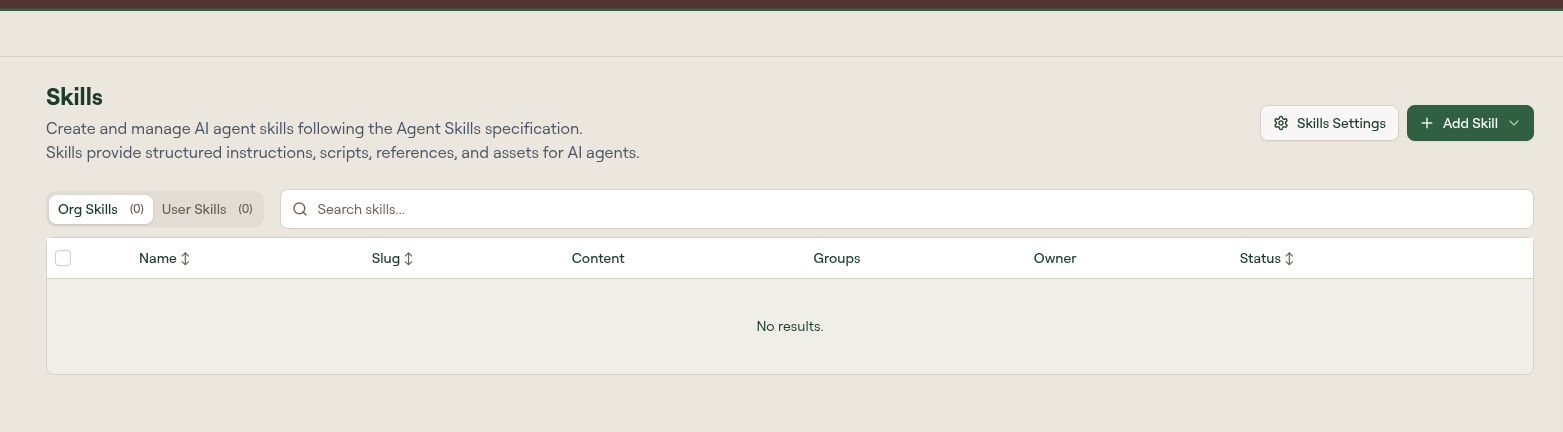
Two tabs at the top of the list switch between scopes, each showing a count:
| Scope | Contents |
|---|---|
| Org Skills | Skills owned by the organization. These can be published, assigned to groups, and wrapped as plugins. |
| User Skills | Skills an individual user created for themselves. They stay private to that user unless shared. |
Table columns
The table supports search and sortable columns.
| Column | Description |
|---|---|
| Name | Display name of the skill. Select a row to open its edit page. |
| Slug | URL-safe identifier, set at creation. |
| Content | Summary of what the skill bundles (instructions plus any scripts, references, and assets). |
| Groups | Number of groups whose members have access to this skill. |
| Owner | The owning admin, or a dash for organization-scoped skills. |
| Status | Publish state. See Review states. |
| Risk | The skill's AI risk score out of 10, color-coded by band. A dash means the skill has not been assessed yet. Scoring uses the shared model described in How Willow Assesses Risk. |
| Updated | When the skill was last changed. |
Search matches skill names by default. Search in instructions next to the search field widens it to the body of each skill, which is how you find every skill that mentions a particular tool, path, or credential without opening them one at a time.
Two filter buttons, Pending review and Rejected, narrow the list to skills in those states.
The table header also has a download control that exports the current list.
Add a skill
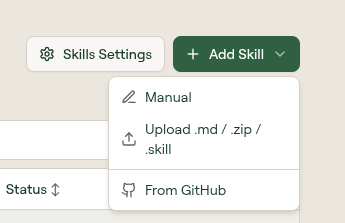
Select Add Skill to open a menu with three creation paths:
| Path | Use it when |
|---|---|
| Manual | You want to author the skill directly in Willow. |
| Upload .md / .zip / .skill | You have an existing skill file to import. |
| From GitHub | You want to import skills from a repository's skills/ folder. |
See Create and Publish a Skill for each path in detail.
Skills Settings
Skills Settings is a separate page controlling how skills are synced, imported, and reviewed: the Skill Guard Policy, the Skill Review Policy, and Sync from GitHub. Select Skills Settings on this page to open it.
See Skills Settings for the full reference.
Review states
A skill's Status is normally draft or active, and publishing moves it from one to the other. A skill that is about to go live is first checked in the background and shows a Scanning badge. The two Skills Settings policies above add two more states, both reachable from the filter buttons on the list:
| State | How a skill gets here |
|---|---|
| Scanning | Saved as a hidden draft while the background security scan (guard checks and AI risk score) runs. This happens when you select Create & Publish, or when an upload or GitHub import would publish the skill. The list refreshes on its own, and the skill is then published, held, or rejected according to your policies. |
| Pending review | Held for admin approval, either by the Skill Review Policy risk threshold or by a Skill Guard Policy set to Hold for review. A skill whose scan fails three times in a row is also held here. |
| Rejected | Failed a guard block check while the Skill Guard Policy was set to Reject upload. The skill stays out of the portal and cannot be published. |
With both policies at their defaults, neither state occurs: skills publish as soon as the scan finishes, and skills failing a block check are rejected outright rather than queued.
Row actions
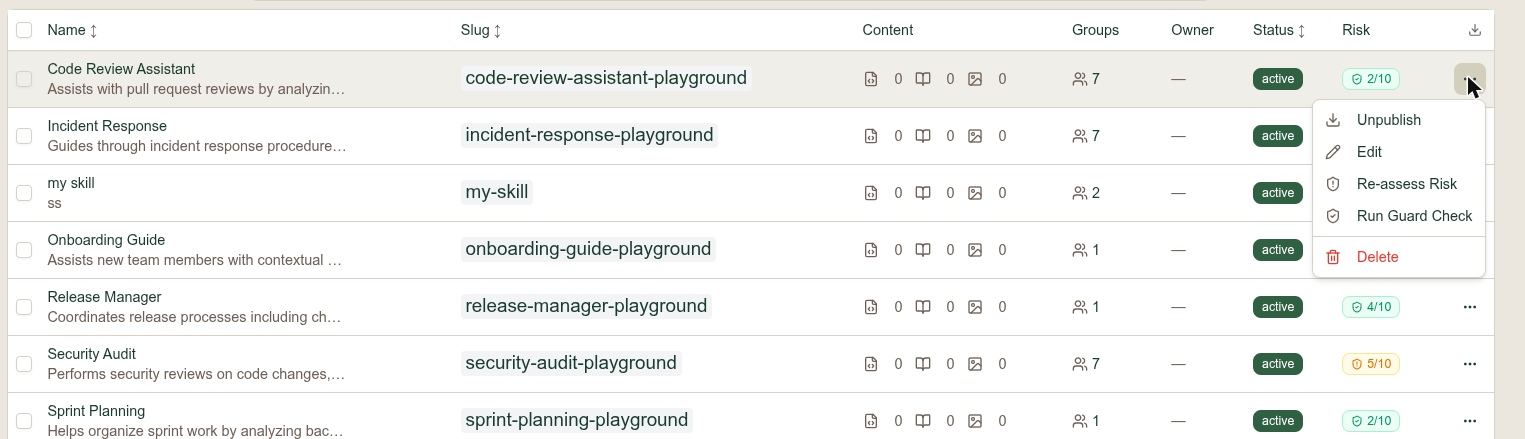
Select the ... menu on any row:
| Action | What it does |
|---|---|
| Publish | Moves the skill from draft to active and makes it available for use. |
| Unpublish | Shown in place of Publish on an active skill. Returns it to draft. |
| Edit | Opens the skill's edit page. |
| Re-assess Risk | Re-runs risk scoring for the skill and updates the Risk column. |
| Run Guard Check | Re-runs the build-time guard checks against the skill's content. |
| Delete | Permanently removes the skill. |
What to do next
- Create and Publish a Skill: manual, upload, and GitHub import
- Assign skills to groups
- Bundle skills into a plugin