Groups
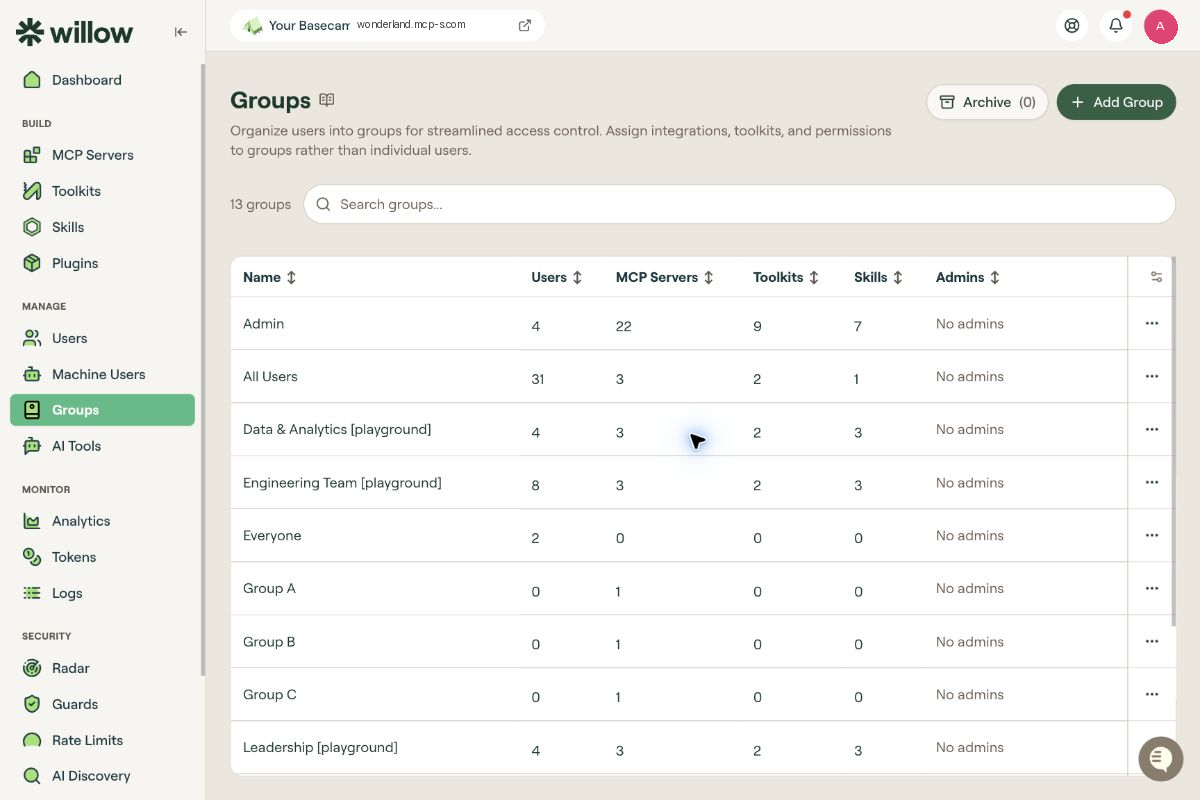
Groups are how Willow grants access. You do not give a user an MCP server directly: you assign the MCP server to a group, and put the user in that group. Everything on this page follows from that.
The Groups page is your organization's list of groups: what each one holds, and who administers it.
What you can do here
- Create and manage groups
- Add users and machine users to a group
- Assign MCP servers, toolkits, and skills to a group
- Give users admin capabilities over a group
- Set per-group behavior such as auto-assignment and token expiration
The groups table
The count above the table shows how many groups you have. Use Search groups to filter the list.
| Column | Description |
|---|---|
| Name | The group name. |
| Users | How many users belong to the group. |
| MCP Servers | How many MCP servers are assigned. |
| Toolkits | How many toolkits are assigned. |
| Skills | How many skills are assigned. |
| Admins | Who administers the group, or No admins. |
Every column is sortable. There is no separate group detail page: you manage a group entirely through the ... menu at the end of its row.
Built-in groups
Two groups exist in every organization and are worth understanding before you create your own.
- All Users: everyone in the organization. Assign a resource here when every user should have it.
- Admin: the group backing administrative access.
Use a custom group to make resources available to a specific team or user type. Use All Users when everyone in the organization should receive them.
Row actions
Select the ... menu on any row:
| Action | What it does |
|---|---|
| Edit MCP Servers | Assigns or removes MCP servers. |
| Edit Users | Adds or removes users. |
| Edit Toolkits | Assigns or removes toolkits. |
| Edit Skills | Assigns or removes skills. |
| Edit Admins | Gives users admin capabilities over the group. |
| Settings | Renames the group and edits its Advanced Settings. |
| Delete | Deletes the group. |
Delete is destructive. Members lose whatever access the group was granting them.
See Create and Configure a Group for each action in detail.
Group admin roles
Group admins are scoped to a single group. They are separate from the organization-wide admin roles on the Roles page, which share some of the same words but grant access across all of Willow.
| Role | Capabilities |
|---|---|
| Owner | View group analytics; manage group toolkits and skills; promote group resources to the organization. |
| AI Champion | View group analytics; manage group toolkits and skills; promote group resources to the organization. |
| Viewer | View group analytics. |
Willow lists the same capabilities for Owner and AI Champion. Choosing between them signals intent rather than a difference in what the person can do.
To assign one, see Assign group admins.
What to do next
- Create and Configure a Group: create a group, add users, assign resources, and assign admins
- Advanced Settings: auto-assign, drafts, admin sync, and token expiration
- Make MCP Servers, Toolkits, Skills, and AI Tools Available to Users
- Invite Users and Manage Access with Groups
- Users and Machine Users
- Identity and Permissions