Guards: Runtime vs Build-time
Guards are Willow's security layer. They inspect content at specific points in the system and determine what to do with it: allow it, stop it, or allow it through with sensitive parts removed. There are two categories, and they fire at completely different moments because they're protecting against different things.
Runtime guards
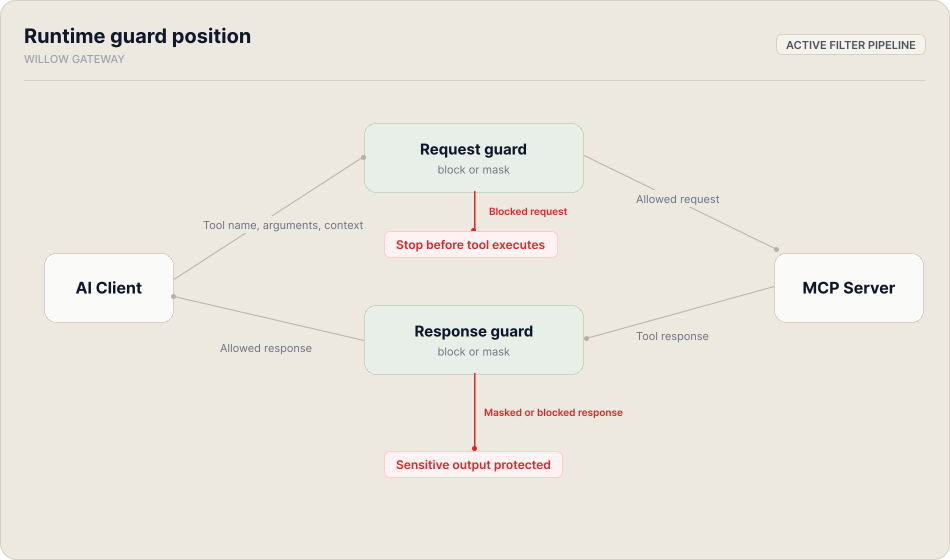
Runtime guards fire on every MCP request and response that passes through the Willow gateway.
On the inbound side, a runtime guard inspects a tool call's content before it reaches the MCP server: the tool name, arguments, and context. If the content violates a configured policy, the guard can stop the call before the tool ever executes, or allow it through with the flagged content masked. On the outbound side, the guard inspects the MCP server's response before it returns to the AI client, with the same options: block it or mask the parts that shouldn't pass through.
Runtime guards are stateless. Each request and response is evaluated independently, with no memory of previous calls. They protect against threats that arrive in live usage: prompt injection in tool call arguments, sensitive content being passed to external services, or PII and credentials surfacing in tool responses.
For admins, runtime guards are the primary enforcement mechanism for live usage policy. For end users, a guard decision is the most common explanation for why a tool call was blocked or why a response looks different from what the tool would return directly.
Build-time guards
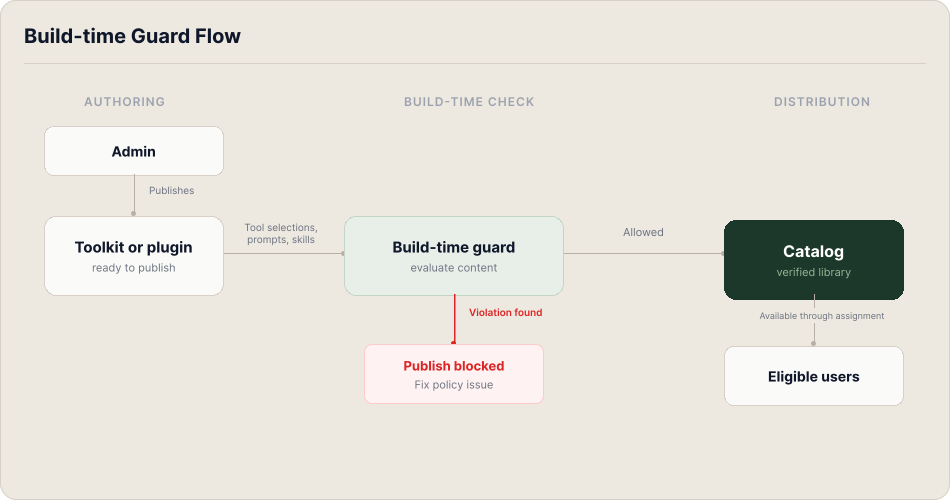
Build-time guards fire at a completely different moment: when an admin publishes a toolkit or plugin. They have no involvement in live tool calls.
At publish time, the guard inspects the content of the object being distributed: the tool selections, embedded prompts, skill text, and command definitions. If the content violates a configured policy, the publish is blocked. The object can't be distributed until the issue is resolved.
This catches policy violations at the supply side, before content reaches users' AI clients, rather than at runtime after it's already in use. A prompt with disallowed instructions embedded in a toolkit, a skill file with hardcoded credentials, a plugin that packages tools from a restricted service: these are the kinds of issues build-time guards are designed to intercept before distribution.
How they work together
The two categories defend at different points in the system. Build-time guards check content in toolkits, skills, and plugins before it reaches users. Runtime guards check content in actual tool calls and responses as it happens.
A toolkit can pass all its build-time checks and still trigger a runtime guard if a user invokes it with content that violates the runtime policy. The build-time check certified the toolkit as distributable; it says nothing about every possible way a user might invoke its tools.
- Admins: to create and configure guards, see Guards or follow the Enable a Guard and See It Fire tutorial. That section covers setup options and how guard decisions appear in the logs.
- End users: if a tool call was blocked or a response looks unexpected, a guard decision is likely the cause. Your admin can see the full decision record in the logs.