How Willow Works
Willow operates at two layers. The first is the configuration layer: the admin dashboard, where the platform is set up, specifying which tools are available, who can access them, and what security policies apply. The second is the enforcement layer: the MCP gateway, which applies those decisions in real time on every tool call that passes through it.
The gateway is the part both roles interact with, though from opposite directions. Admins configure what it enforces and use its logs to observe what's happening. End users' AI clients pass through it on every tool call, usually without knowing it's there.
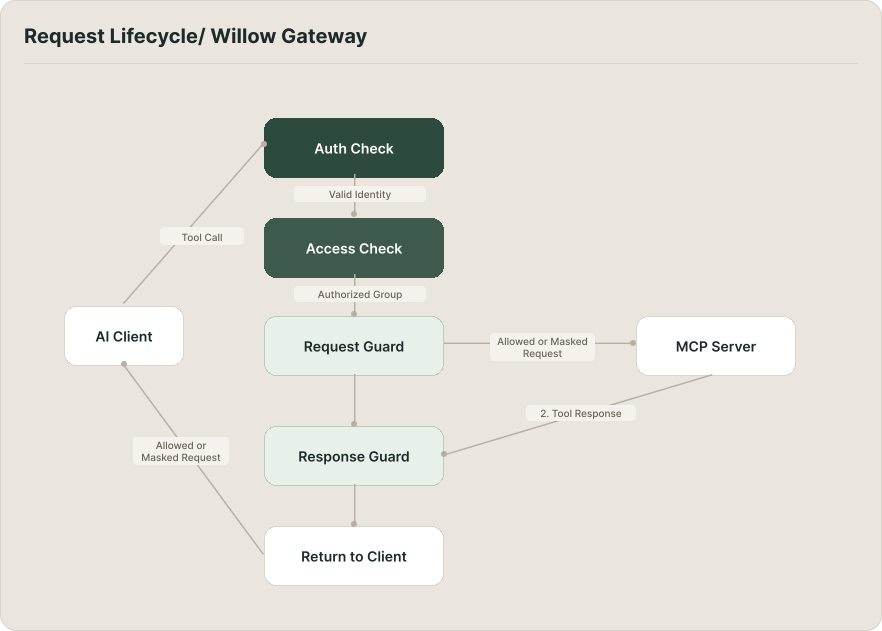
The path of a tool call
AI clients are configured with a Willow MCP URL instead of a direct tool URL. When an agent calls a tool, the request goes to the Willow gateway, not to the tool directly. From the agent's perspective it's making a normal MCP call. The gateway processes it before it goes any further.
The first check is identity. Every request carries credentials (an API key or OAuth token), and the gateway matches them to a user record in the organization. If credentials are missing or invalid, the request is denied here. Nothing else runs.
With the user identified, the gateway checks access. It looks at which groups that user belongs to and which MCP servers are assigned to those groups. Having valid credentials is not the same as having permission to reach a specific tool. If the tool's MCP server isn't covered by the user's groups, the request is denied.
That check passed, the request moves through the security layer: runtime guards. Guards inspect the content of the request before it reaches the tool. Depending on what they find and what action is configured, they can stop the request entirely or allow it through with flagged content removed.
If the request clears all of that, the gateway proxies it to the actual MCP server. The tool executes as a normal MCP call. The MCP server has no visibility into the gateway or the checks that ran upstream.
The response travels back through the gateway before it reaches the AI client. Response guards can inspect and modify it, masking sensitive output like PII, credentials, or internal identifiers before the agent sees it.
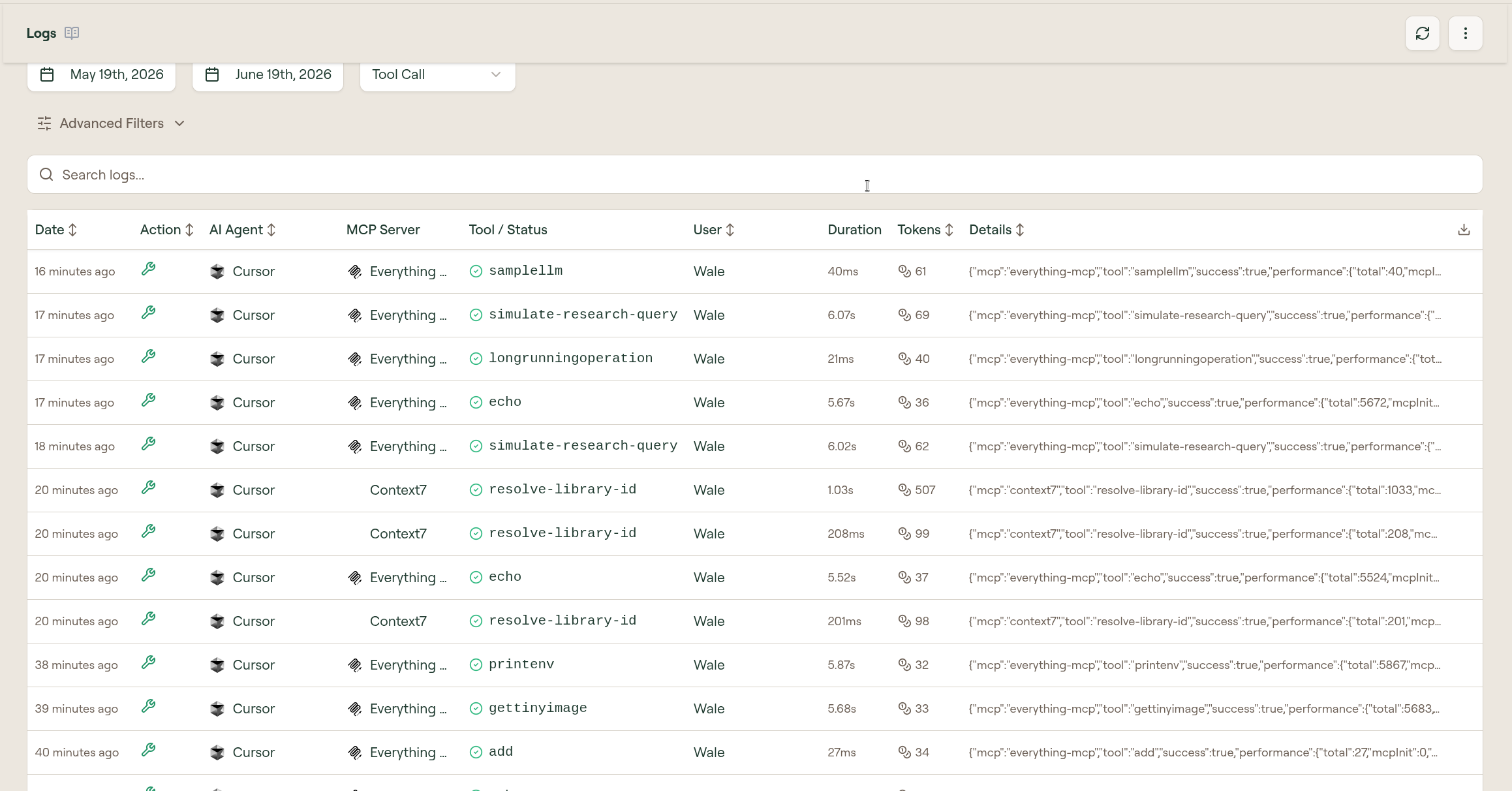
Every stage is logged: the authentication result, the access decision, any guard actions, the tool call, and the response. Admins can see the full record in the Logs page, with enough detail to understand exactly what happened and why.
When a user uses tools from an MCP server, those calls appear in Logs with the AI agent, MCP server, tool status, user, duration, token count, and execution details.
Authentication
The gateway supports two authentication methods. The simpler is a Willow API key, a wxt_-prefixed token embedded in the MCP URL, read on every request. The other is OAuth: the AI client completes an OAuth flow with Willow and receives a short-lived access token.
The choice of method is a configuration decision. It doesn't affect what happens after the identity check. Once the user is identified, the rest of the process is identical.
What the gateway doesn't do
The gateway controls access and inspects content. It doesn't modify tool behavior or add capabilities tools don't natively have. Whatever a tool does, it does the same way through Willow as it would if called directly. Willow governs who can reach it and what content passes through, not what the tool itself does.
Ready to get started?
- As an admin: set up Willow for the first time
- As an end user: connect your AI client