Some screenshots show mcp-s.com, which some existing organizations still use. New organizations use withwillow.ai. Copy the URLs shown in your own organization.
Toolkits
A toolkit is a curated collection of tools drawn from your MCP servers, packaged with optional prompts and resources for a specific team or workflow. Open it from Build > Toolkits.
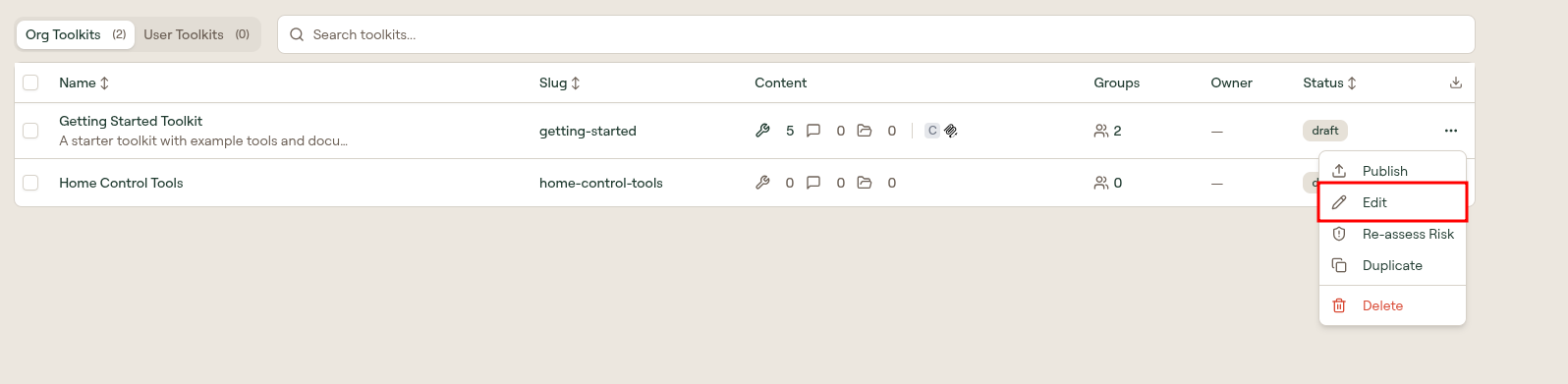
The list page is your organization's inventory of toolkits. Each row is one toolkit; selecting a row opens its edit page, where the Tools, Prompts, and Resources tabs live.
Scopes
Two tabs at the top of the list switch between scopes, each showing a count:
| Scope | Contents |
|---|---|
| Org Toolkits | Toolkits owned by the organization. These can be published, assigned to groups, and wrapped as plugins. |
| User Toolkits | Toolkits an individual user created for themselves. They stay private to that user unless shared. |
How access is evaluated
A toolkit decides which tools a client loads. It is not the thing Willow checks permissions against. Access is evaluated on the MCP server, so a toolkit narrows what a user sees but never widens what they can reach.
Three consequences are worth knowing before you plan a rollout:
- Granting a toolkit to a group does not grant the MCP servers inside it. The group still has to be assigned each MCP server itself. If members can open the toolkit but see none of its tools, that is the missing grant — not a broken toolkit. Assign the MCP server to the group, then reconnect the client; an existing session keeps its old tool list until the client reconnects.
- A toolkit URL does not re-check toolkit membership by default. The slug resolves organization-wide, so anyone who already has access to an MCP server in the toolkit can connect through that URL, whether or not the toolkit is assigned to their group. Turn on Restrict Toolkit Access in Security Settings to make the group assignment binding.
- Removing a tool from a toolkit only changes that toolkit's catalog. It is not an enforcement control: the user can still reach the tool through any other toolkit or MCP connection they have. To actually block a tool, disable it on the MCP server. When two teams need different tool sets from the same upstream server, define two MCP servers and assign each to its own group.
Table columns
The table supports search and sortable columns.
| Column | Description |
|---|---|
| Name | Display name, with the toolkit description shown beneath it. Select a row to open its edit page. |
| Slug | URL-safe identifier, set at creation. Used in the toolkit's connection URL. |
| Content | Counts of the included tools, prompts, and resources, followed by a risk badge summarizing the toolkit's tools. |
| Groups | Number of groups whose members can use this toolkit through the gateway. |
| Owner | The owning admin, or a dash for organization-scoped toolkits. |
| Status | Publish state: draft or active. |
| Risk | The toolkit's risk score out of 10, color-coded by band. A dash means it has not been assessed yet. Use the Re-assess Risk row action to re-run scoring. See How Willow Assesses Risk. |
An export icon at the top right of the table downloads the list.
Row actions
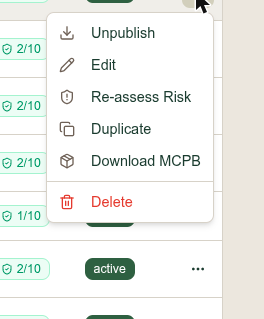
Select the ... menu on any row:
| Action | What it does |
|---|---|
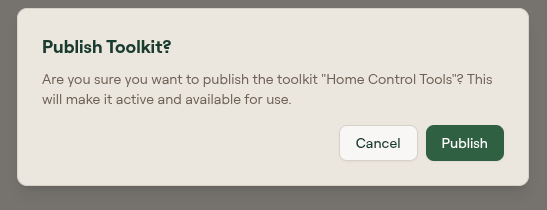
| Publish | Moves the toolkit from draft to active and makes it available for use. Opens a confirmation dialog. |
| Unpublish | Shown in place of Publish on an active toolkit. Returns it to draft and withdraws it from use. |
| Edit | Opens the toolkit edit page. |
| Re-assess Risk | Re-runs risk assessment across the toolkit's tools. A "Risk assessed" toast confirms completion. |
| Duplicate | Creates a copy of the toolkit as a new draft. |
| Download MCPB | Downloads the toolkit as an MCP bundle. |
| Delete | Permanently removes the toolkit. |
Bulk actions
Tick the checkbox on one or more rows and a bar of bulk actions appears above the list:
| Action | What it does |
|---|---|
| Assign groups | Opens a group picker and adds every selected toolkit to the groups you choose. Toolkits the groups already have stay assigned, so nothing is removed. Needs permission to edit groups. |
| Publish | Publishes the selected draft toolkits and skips ones already active. Needs publish permission. |
| Unpublish | Returns the selected active toolkits to draft. Needs publish permission. |
| Delete | Permanently removes the selected toolkits. |
As with how access is evaluated, assigning a toolkit to a group does not grant the MCP servers inside it.
Publish states
A toolkit is created as a draft. Draft toolkits are visible to admins in this list but are not available for use. Publishing changes the status to active.
AI Toolkit Suggestions
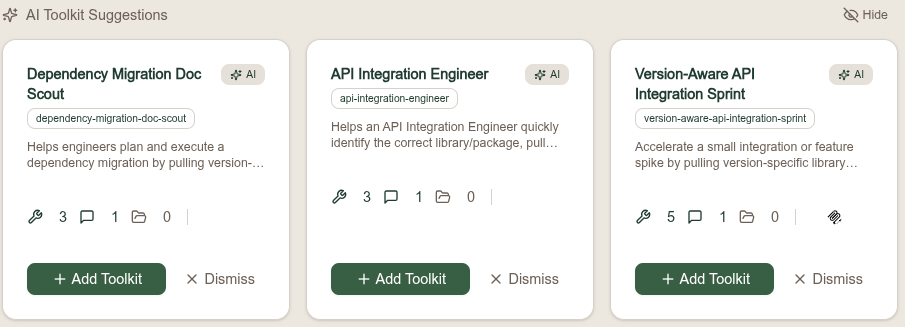
Above the list, Willow proposes toolkits it has assembled for you. Each suggestion card carries an AI badge and shows the proposed name, slug, description, and counts of the tools, prompts, and resources it would include.
| Control | What it does |
|---|---|
| Add Toolkit | Creates the suggested toolkit in your organization. |
| Dismiss | Removes that single suggestion from the strip. |
| Hide | Collapses the whole suggestions strip. |
Like the other AI features on this page, suggestions depend on Bring Your Own AI being configured under Settings › AI Settings.
Let users build toolkits with AI
If you connect your own AI provider under Settings › AI Settings, users can describe an agent in plain language and have Willow generate a toolkit for them. This is off until you enable Bring Your Own AI; the default gateway does not power it. See Create a Toolkit for the AI creation flow.
What to do next
- Create a Toolkit: build one manually or with AI
- Toolkit Edit Page Reference: Tools, Prompts, and Resources tabs
- Assign toolkits to groups
- Wrap a toolkit in a plugin for marketplace distribution