Risk Assessment
Willow scores the security posture of every MCP server so you can see, at a glance, how exposed an integration is before you publish it. The score is a number from 0 to 10, where lower is safer, paired with a risk band such as Low Risk or Critical Risk.
Where it appears
Risk Assessment shows up in two places:
- MCP Servers list. The Risk column shows each server's overall score and band. A server that has not been assessed yet shows a dash (
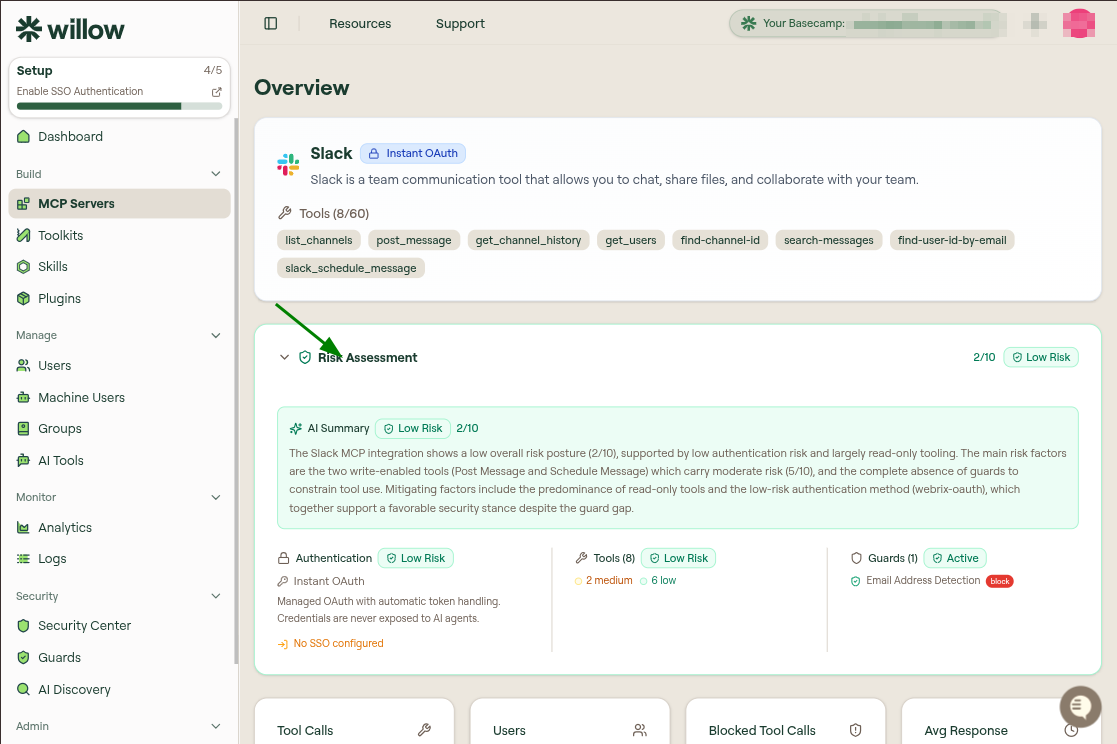
—). The column is sortable, so you can bring the highest-risk servers to the top. - Overview tab. Opening a server shows a Risk Assessment card between the tool list and the metric cards. This card carries the full breakdown: the overall score, an AI summary, and the three dimensions below.
Overall score and bands
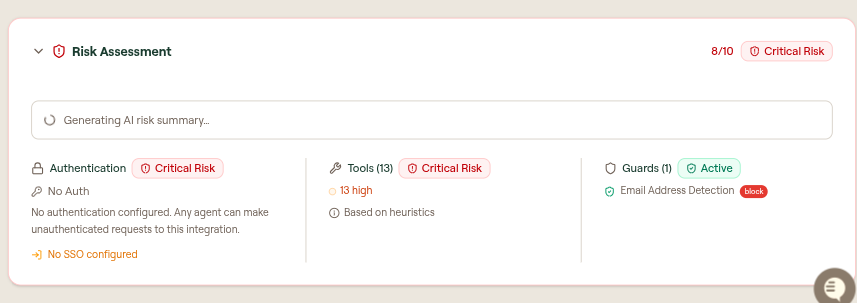
The overall score summarizes the server's posture into a single 0-10 value and a band. Bands run from Low Risk through to Critical Risk and are color-coded: green for low, amber for elevated, and red for critical. For example, a read-only integration with managed OAuth might score 2/10 (Low Risk), while an unauthenticated server exposing write tools might score 8/10 (Critical Risk).
AI summary
The card includes an AI Summary: a short narrative that explains the overall posture and calls out the main risk factors and mitigations, such as write-enabled tools, the authentication method, and whether any guards constrain tool use. The summary regenerates when the assessment refreshes, and shows a Generating AI risk summary state while it is being produced.
The AI Summary is powered by your connected AI provider. It is available only when Bring Your Own AI is enabled under Settings › AI Settings; the default gateway does not generate it. The overall score and the three dimensions below are calculated from heuristics, so they appear even before the summary finishes generating.
Dimensions
The score is built from three dimensions, each with its own band:
| Dimension | What it evaluates |
|---|---|
| Authentication | The upstream authentication method and whether SSO is configured. No authentication scores as Critical Risk because any agent can make unauthenticated requests to the integration. Managed OAuth, where credentials are never exposed to AI agents, scores low. A No SSO configured note appears when SSO is not enabled. |
| Tools | The discovered tools, scored by heuristics and broken down into high, medium, and low counts. Write and delete tools carry more risk than read-only tools, so a server with many high-risk tools raises the overall score. |
| Guards | The runtime guards applied to this server. Active guards, such as Email Address Detection, lower risk by constraining what tools can do. |
Refreshing the assessment
Tool-level risk feeds the Tools dimension. Use Re-assess Risk on the Tools tab, or from an individual tool's row menu, to refresh tool scoring after you sync or change tools. See Manage tools for details.
Improving a score
To lower a server's risk:
- Configure authentication on the upstream connection, and enable SSO for user access. See Configure authentication.
- Disable high-risk tools you do not need, and expose read-only tools first. See Manage tools.
- Enable guards to filter prompts and responses at runtime. See Guards.