Plugins
A plugin is a self-contained bundle that extends your agents with skills, toolkits, commands, rules, hooks, sub-agents, and MCP servers. Package related capabilities into one installable unit and distribute it to Cursor, Claude, GitHub Copilot, and Codex through a marketplace, or to OpenCode as a native config layout. Open it from Build > Plugins.
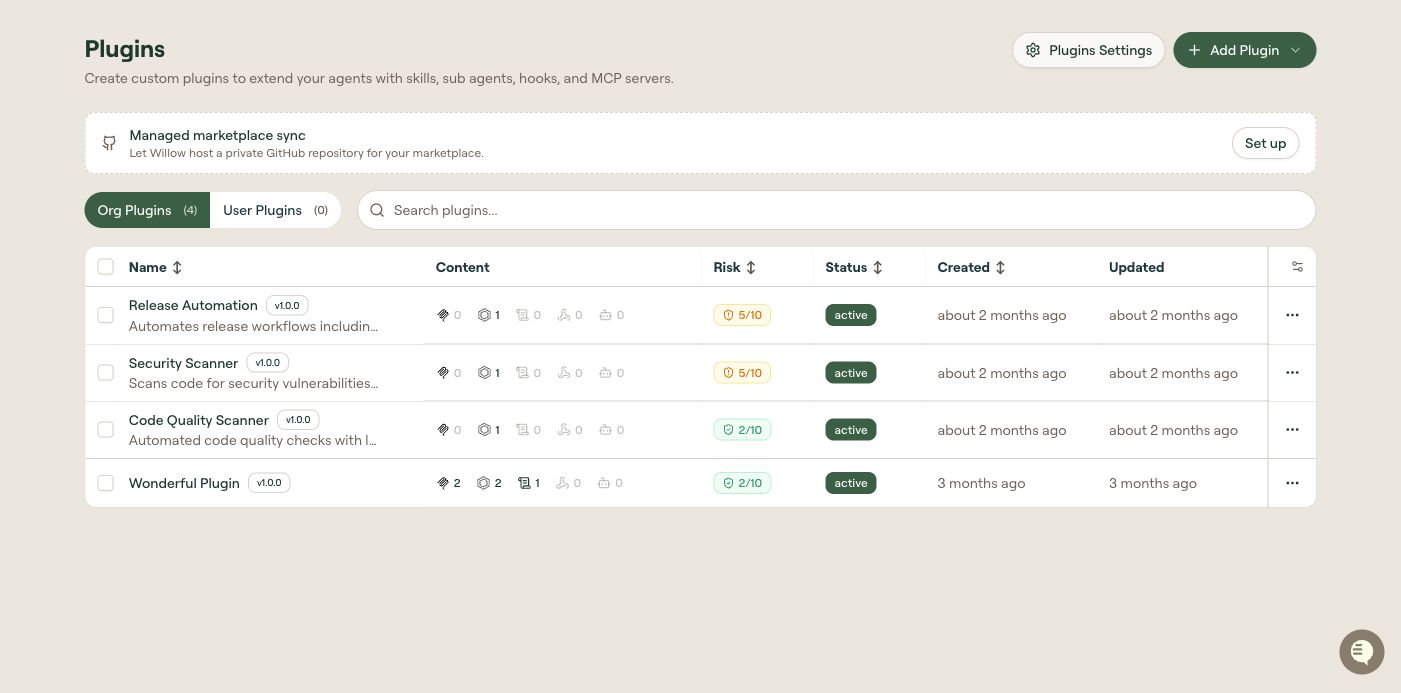
Table columns
The list page separates Org Plugins and User Plugins into tabs. Use Org Plugins for organization-owned bundles and User Plugins to inspect user-owned bundles. User-owned plugins remain private; appearing in the admin list does not publish them to the organization marketplace.
The list supports search and sortable columns. Table settings is available at the right of the table header.
| Column | Description |
|---|---|
| Name | Display name of the plugin, followed by its version badge and the description beneath. Select a row to open its edit page. |
| Content | Summary of the components the plugin bundles (skills, toolkits, commands, rules, hooks, sub-agents, MCP servers). |
| Risk | The plugin's risk score out of 10, color-coded by band. See How Willow Assesses Risk. |
| Status | Publish state: draft or active. |
| Created | When the plugin was created; supports sorting. |
| Updated | When the plugin was last updated. |
Open Table settings to choose which columns are visible or select Export CSV to download the list.
Row actions
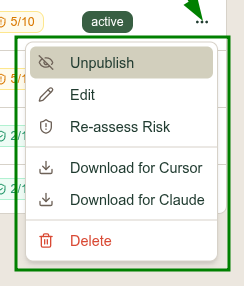
Select the ... menu on any row:
| Action | What it does |
|---|---|
| Publish | Moves the plugin from draft to active so it can appear in the marketplace. |
| Unpublish | Shown in place of Publish on an active plugin. Returns it to draft. |
| Edit | Opens the plugin's edit page. |
| Re-assess Risk | Re-runs risk scoring and updates the Risk column. |
| Download for Cursor | Downloads the plugin packaged for Cursor. |
| Download for Claude | Downloads the plugin packaged for Claude. |
| Delete | Permanently removes the plugin. |
On the plugin's edit page, Download separates Plugin downloads from Marketplace downloads for Cursor and Claude. See Download for local testing.
Publish states
A plugin is created as a draft. Draft plugins are visible only to admins in this list. A plugin must have status: active to appear in the marketplace. Only organization-level plugins (no owner) are published; user-owned plugins remain private. See Distribute a Plugin for the full publish and sync flow.
Marketplace sync status
When marketplace sync is active, a status banner appears at the top of the list page showing:
- Sync status: Active (green indicator) or Paused
- Sync mode: Push to GitHub, Pull from GitHub, or Two-way sync
- Target repository: a link to the GitHub repository
- Target platforms: icons for each enabled platform (Cursor, Claude, GitHub Copilot, Codex, OpenCode)
If managed marketplace sync is available but not yet configured, a setup prompt appears with a Set up button.
Plugin Settings
Plugin Settings is a separate page controlling organization-wide plugin behavior: the marketplace name, auto-create sync options, target platforms, GitHub sync, and the custom install command. Select Plugins Settings, or the gear icon on this page, to open it.
See Plugin Settings for the full reference.
What to do next
- Create a Plugin: create one and add components
- Plugin Components Reference: every component type and field
- Distribute a Plugin: publish, download, and sync