Configure OneLogin
Set up OneLogin as your identity provider using an OpenID Connect (OIDC) app.
Before you start, find your callback URL on the Configure SSO page: {gatewayUrl}/api/auth/callback/onelogin.
Create an OIDC app in OneLogin
- In the OneLogin Admin Portal, go to Applications → Applications
- Select Add App, search for
OpenId Connect, and select OpenId Connect (OIDC) - Set a Display Name (e.g. "Willow") and select Save
- Open the Configuration tab and set:
- Login Url: your Willow dashboard URL
- Redirect URI's:
{gatewayUrl}/api/auth/callback/onelogin
- Open the Parameters tab and confirm the app sends the standard OIDC claims — Willow reads
emailfor the user's identity andnamefor their display name - Open the SSO tab and:
- Copy the Client ID and Client Secret
- Copy the Issuer URL (
https://your-subdomain.onelogin.com/oidc/2) - Set Token Endpoint → Authentication Method to Basic
- Select Save
Willow requests the openid, profile, and email scopes, and discovers the rest of the endpoints from {issuer}/.well-known/openid-configuration.
For more details, see OneLogin's guide to Connecting an OIDC enabled app.
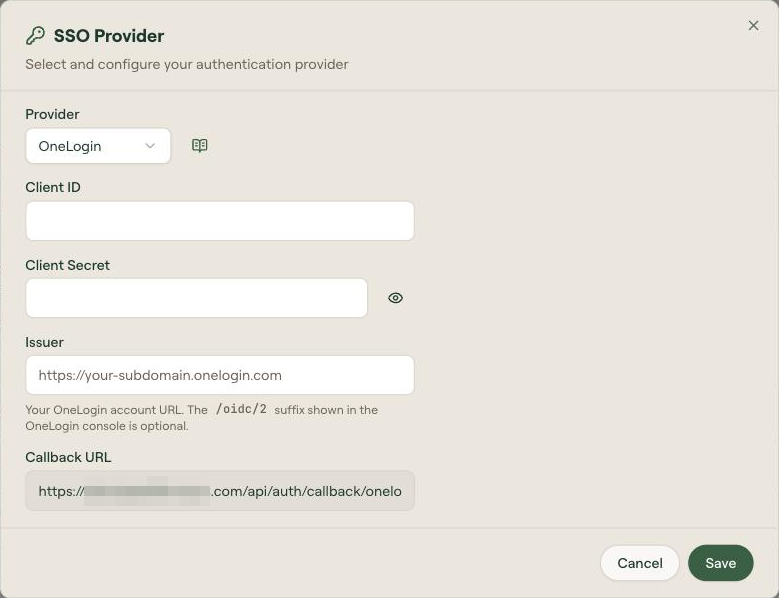
Finish in Willow
- Go to Admin → Settings → Authentication Settings
- On the SSO Provider card, select Edit
- Select Provider: OneLogin
- Enter:
- Client ID: from the app's SSO tab
- Client Secret: from the app's SSO tab
- Issuer:
https://your-subdomain.onelogin.com— the/oidc/2suffix that OneLogin displays is optional, Willow accepts either form
- Select Save
Assign users or roles
In the OneLogin Admin Portal, open the Willow application → Access tab → select the roles that should have access. You can also assign individual users from Users → Applications.
Troubleshoot
- Test OIDC discovery: visit
https://your-subdomain.onelogin.com/oidc/2/.well-known/openid-configuration. You should get a JSON response. - An
invalid_clienterror during token exchange usually means the app's Token Endpoint → Authentication Method is set to POST instead of Basic - If sign-in succeeds but users have no display name, check the Parameters tab is sending the
nameclaim