Enterprise-Managed Authentication
Enterprise-managed authentication lets Claude connect to Willow on behalf of your users without asking them to sign in. Okta vouches for the user, so access to Willow in Claude follows the app assignments and policies you already manage in Okta.
Okta calls this Cross App Access (XAA), and Claude calls it Managed authorization.
How it works
Before you begin
- Willow uses Okta for SSO. See Configure Okta.
- Your users exist in Willow. Willow matches the Okta user by their SCIM identity, or by email, and never creates new users. SCIM provisioning keeps this in sync.
- Your Claude Team or Enterprise organization signs in with Okta.
Values you'll need
| Value | Example | Used in |
|---|---|---|
| Willow gateway URL | https://acme-corp.withwillow.ai (SaaS) or your CONNECT_URL (On-Premise) | Okta, as the Issuer URL |
| Willow MCP URL | https://acme-corp.withwillow.ai/mcp | Claude, as the connector URL |
Step 1: Turn it on in Willow
- Go to Admin → Settings → Authentication Settings, with Provider: Okta selected.
- Check Enable enterprise-managed authentication.
- Confirm the JWKS URI field, which is filled in automatically from your Okta issuer.
- Select Save Changes.
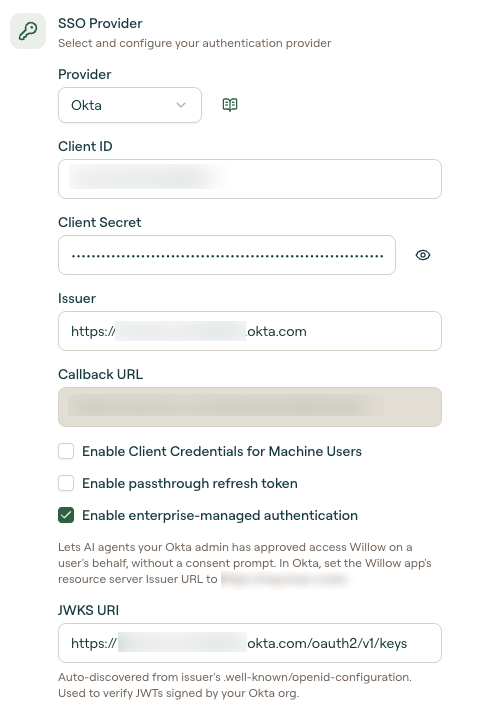
Step 2: Enable Cross App Access on the Willow app in Okta
- In the Okta Admin Console, go to Applications and Resources → Applications and open the Willow app.
- Open the Resource Server tab.
- Under Cross-app access (XAA), select Edit and enable it.
- Set Issuer URL to your Willow gateway URL exactly, with no trailing
/and no/mcp. - Select Save.
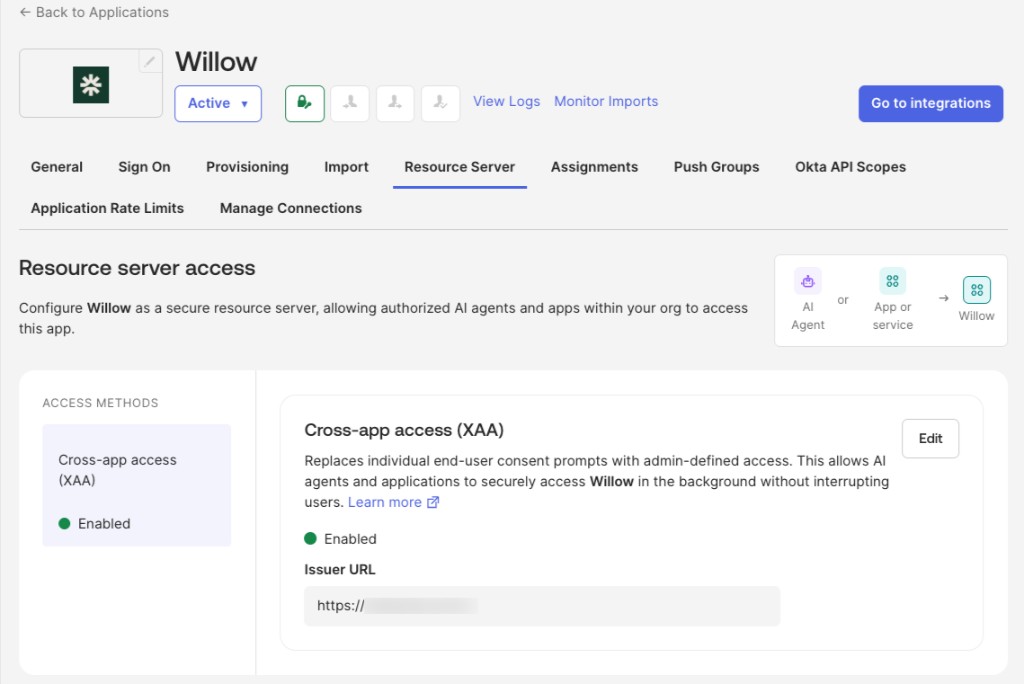
Step 3: Connect Willow in Claude
- In Claude, go to Organization settings → Connectors and select Add custom connector.
- Enter a name and your Willow MCP URL.
- Under Connection methods, turn on Managed authorization.
- Select Run test and confirm every step passes, then save the connector.
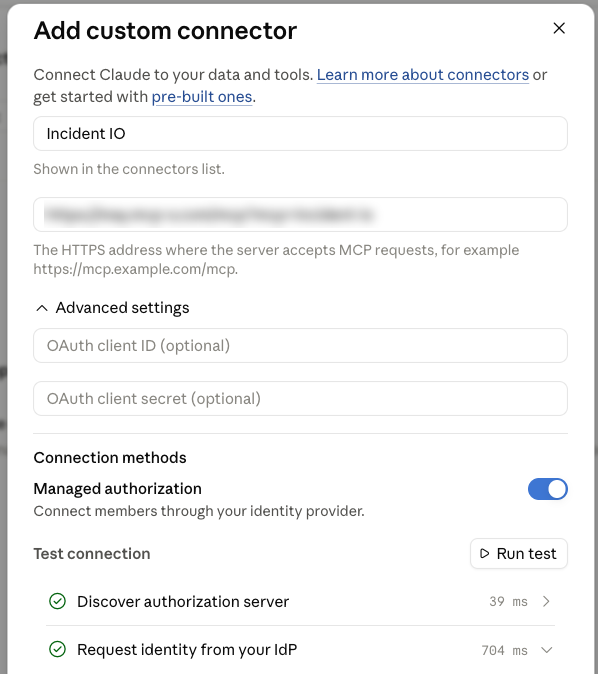
The test passes only once Claude is registered as an AI agent in Okta with access to the Willow app. See Claude's guide to authorizing MCP connectors for your organization and Okta's guide to configuring AI agent access to an app.
Once saved, your users see the connector in their Claude connectors list with Managed authorization, already connected.

What your users experience
- Willow is available in Claude with no sign-in prompt.
- Tool permissions, toolkits, and audit logs apply to the matching Willow user, exactly as after a browser sign-in.
- Access follows Okta. When you unassign or deactivate a user in Okta, their access to Willow from Claude ends within an hour.