Guard Hooks
Guard Hooks evaluate coding-agent prompts and tool activity against your runtime guards. Configure fleet-wide hooks through the Scan Agent in AI Discovery Settings. For a manual installation, use the Willow Guard Hooks plugin.
Supported agents
| Agent | Coverage | Status |
|---|---|---|
| Claude Code | Prompts, file tool calls, and PII/secret masking on tool output | Available |
| Cursor | Prompts, tool calls, and tool-output context | Available |
| Codex | Prompts, file tool calls, and tool-output masking | Available |
| GitHub Copilot CLI | Prompt logging, tool calls, and PII/secret masking on tool output | Available |
| Pi | Prompts and tool calls through the Willow Pi extension | Available |
Prerequisites
- Admin access to Willow.
- At least one active runtime guard.
- The Scan Agent installed and connected on each device for fleet-wide configuration.
Configure hooks with the Scan Agent
- Open Control > Guards > Setup & Coverage.
- Beside Claude Code, Cursor, Codex, or Pi, select Configure in AI Discovery. This opens AI Discovery Settings > Guard hooks at that agent's card.
- Expand the card and choose which hooks to include. For tool hooks, select the tools to evaluate. Add custom tool / edit expression lets you enter a tool matcher.
- Turn on the platform's guard-hooks switch.
- Let the Scan Agent collect the settings on its next sync, then restart the coding agent.
- Test a prompt or tool call against an active guard. Check the decision in Runtime > Guard flags or Monitor > Logs.
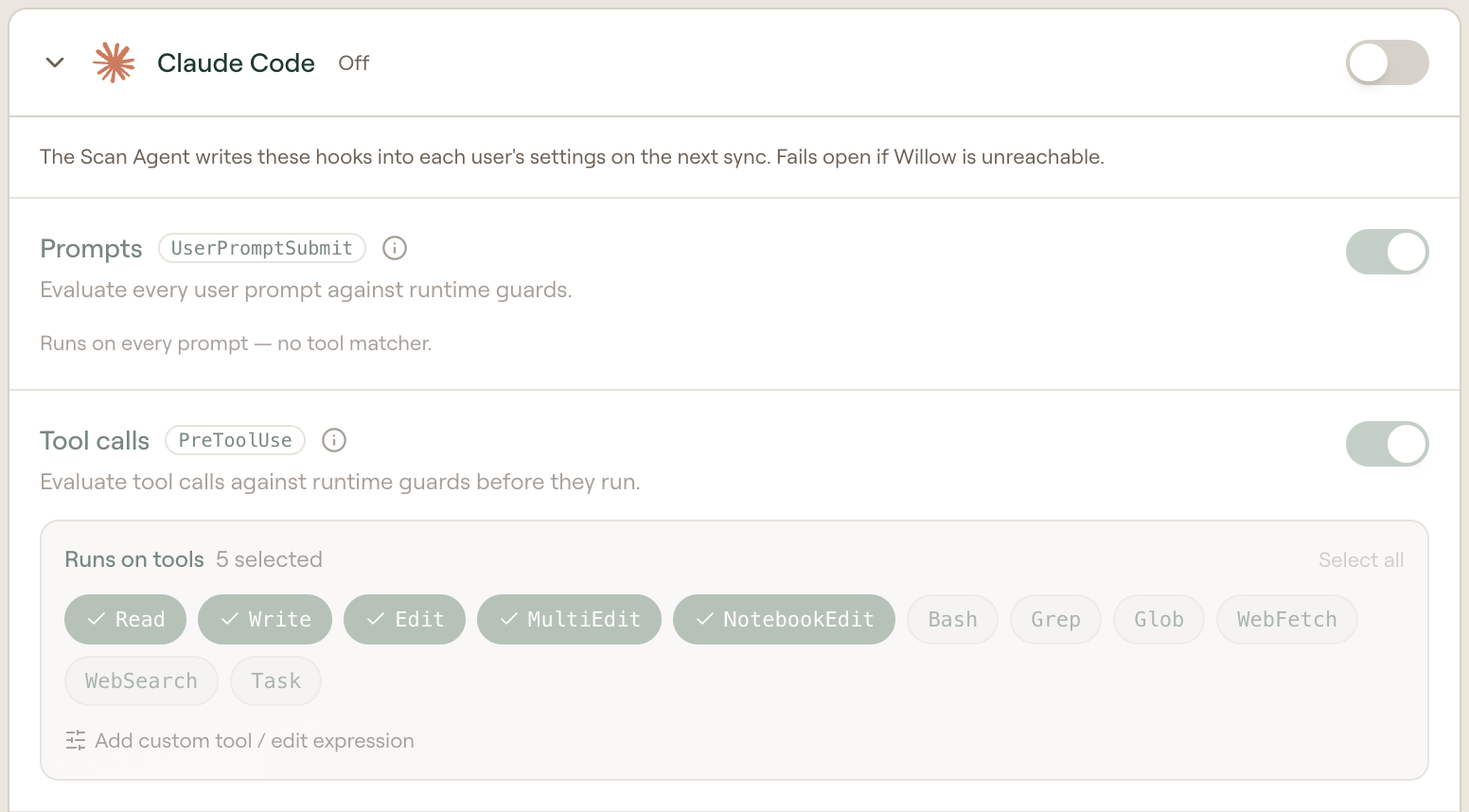
| Platform | Hook choices |
|---|---|
| Claude Code | Prompts, Tool calls, Tool output, and Skills and commands. The last records skill and slash-command use for Analytics. |
| Cursor | Prompts, Tool calls, and Tool output. Tool output adds model context after Read or Shell. |
| Codex | Prompts, Tool calls, and Tool output. |
| GitHub Copilot CLI | Prompts, Tool calls, and Tool output. Copilot ignores hook output for prompts, so a prompt is logged and alerted on but can't be blocked or redacted. Only a tool call can be blocked. |
| Pi | Prompts and Tool calls. |
Hook evaluations fail open by default: if Willow is unreachable or a request times out, the agent continues. To block instead, turn on Block when Willow can't be reached under a Tool calls hook. It is off by default and is not offered on Prompts, Tool output, or Pi hooks. When it is on, a tool call the hook matches is denied if the guard check can't complete (offline, timeout, or an evaluation error). It takes effect once the device runs a Scan Agent version that supports it.
Install the plugin manually
The Willow Guard Hooks plugin provides downloadable hooks for Claude Code, Cursor, and Codex. Use its setup path for client-side enforcement in Claude Desktop and Cowork.
Step 1 — Activate the guard hooks plugin
Open Control > Guards > Setup & Coverage. Beside Claude Desktop & Cowork, select Set up, then Guard Hooks plugin.
- If the plugin has not been created yet, a dialog explains that guard hooks aren't active. Click Activate hooks to create the Willow Guard Hooks plugin for your organization and open its plugin page.
- If the plugin already exists, you go straight to its plugin page.
The plugin starts as a draft. Publish it when you are ready to make it available through your marketplace.
Step 2 — Choose which hooks run
Choose which hooks to include and configure their matchers:
- Toggle each hook Included / Excluded.
- Tune the tool matcher for tool-use hooks (a pipe-separated list of tool names the hook runs on, e.g.
Read|Write|Edit). Prompt hooks run on every prompt and have no matcher. - For Claude Code tool-use hooks, optionally turn on Block when Willow can't be reached. If the hook times out or fails, Claude Code blocks the tool call instead of letting it run. It is off by default and needs Claude Code 2.1.295 or later.
- Edit the plugin name and description, then Save.
- Download an installation bundle for Claude Code, Cursor, or Codex. The bundle includes your organization token.
These settings apply to the managed configuration (Step 4) and the plugin bundle.
Logging
Two organization-wide switches in Admin > Settings > Log Settings control hook records in Monitor > Logs:
- Log Passed Evaluations — record passing evaluations as well as flagged evaluations. Passing evaluations do not send alerts.
- Log Content — when off, the scanned prompt/tool content and matched snippets are stripped from logged messages. The verdict and which guards fired are still recorded.
The plugin page's Logging card reflects the current state of both and links to the settings page. They apply to Claude Code, Cursor, and Codex hooks.
Step 3 — Deliver the org token via MDM
The hooks authenticate with your organization token. Distribute it through the Scan Agent MDM profile.
If a machine already has the Willow Scan Agent profile, the token is already present and the guard hook reads it directly — you can skip this step for those machines.
macOS — configuration profile (.mobileconfig)
Download the profile from the Scan Agent setup flow (pre-filled for your organization) and push it through your MDM (Jamf, Kandji, Mosyle, or Intune). It writes the token to the com.mcp-s-scan.agent managed-preferences payload. See Deploy the Scan Agent with MDM.
Windows — registry policy (.reg)
Import the registry policy via GPO or deploy it with Intune. It writes the token to HKLM\SOFTWARE\Policies\MCP-S-Scan, which the PowerShell hook reads.
These files contain your organization auth token. Treat them as secrets and distribute them only through your MDM.
Token resolution order
The hook uses the first available token source in this order:
- Willow Scan Agent profile (
com.mcp-s-scan.agent) — the token is delivered by the Scan Agent's MDM profile: the macOS.mobileconfig(com.mcp-s-scan.agentmanaged-preferences payload) or the Windows.reg(HKLM\SOFTWARE\Policies\MCP-S-Scan). This is the same profile used for the Willow Scan Agent (Shadow AI), so any machine that already runs it needs nothing extra (Step 3). - Plugin bundle token file — included in the downloaded plugin for marketplace or local installation (Step 4, Plugin marketplace).
WILLOW_GUARD_TOKENenvironment variable — fallback for dev shells and env-based deploys (e.g. Linux).
Device identity is detected automatically at runtime (the same identity source as the Scan Agent). Optionally set WILLOW_USER_EMAIL to attribute audit decisions to a user; Cursor also forwards the authenticated user's email in the hook payload when available.
Step 4 — Enforce org-wide
Deploy the configured hooks through managed configuration or your plugin marketplace.
Managed configuration
- Claude Code: push the plugin's hooks through Claude Code's
managed-settings.jsonusing the policy builder, which validates the full schema and exports an MDM-ready profile. The token comes from Step 3. - Cursor: deploy the hooks to Cursor's enterprise
hooks.jsonsystem path via MDM so they apply to every user on the machine. - Codex: deploy
hooks.jsonto~/.codex/hooks.jsonor merge the generated hooks into the[hooks]table inconfig.toml.
Plugin marketplace
Publish the Willow Guard Hooks plugin to your marketplace and mark it enforced — agents auto-install it on launch, with the token already delivered from Step 3.
All three agents fail open by default — on a hook timeout or if Willow is unreachable, the agent proceeds. Blocks apply only when Willow responds with a guard block, unless you turned on Block when Willow can't be reached for a tool-call hook.
Hooks reference
Claude Code — merge the copied fragment into your Claude Code settings (user, project, or managed), keeping any existing hook groups:
| Event | Tools | Purpose |
|---|---|---|
UserPromptSubmit | — | Evaluate every prompt |
PreToolUse | Read, Write, Edit, MultiEdit, NotebookEdit | Evaluate file tool calls |
PostToolUse | Bash, Read | Mask PII/secrets in tool output |
Cursor — save the hooks.json as project .cursor/hooks.json, user ~/.cursor/hooks.json, or the enterprise system path, keeping any existing hooks:
| Event | Tools | Purpose |
|---|---|---|
beforeSubmitPrompt | — | Evaluate every prompt |
preToolUse | Read, Write | Evaluate file tool calls |
Codex — save the generated hooks.json as ~/.codex/hooks.json, keeping any existing hook groups:
| Event | Tools | Purpose |
|---|---|---|
UserPromptSubmit | — | Evaluate every prompt |
PreToolUse | Read, Write, Edit, apply_patch | Evaluate file tool calls |
PostToolUse | Shell, Read | Mask PII/secrets in tool output |
The hooks authenticate with Authorization: Bearer <org-token>, using the token source described above. Hooks load at startup, so restart or reload the agent after changing settings.