Deploy Scan Agent with MDM
Deploy the Willow Scan Agent with MDM when you need a repeatable rollout across managed employee devices.
Prerequisites
- Admin access to Willow.
- Admin access to your MDM provider.
- A pilot group of test devices.
- The latest Willow Scan Agent files from the AI Discovery setup flow:
- macOS:
.pkginstaller and.mobileconfigprofile. - Windows:
.zippackage and.regregistry policy. - Linux:
.tar.gzpackage for x64 or ARM64.
- macOS:
Minimum requirements
| Component | Minimum requirement |
|---|---|
| Willow Scan Agent target OS | macOS for the .pkg installer and .mobileconfig profile, Windows x64 for the .zip package and .reg registry policy, or Linux x64 or ARM64 with systemd for the .tar.gz package. |
| macOS deployment tool | An MDM provider that can deploy a signed .pkg installer and a custom .mobileconfig profile to managed Mac devices. |
| Windows deployment tool | GPO, Intune, JumpCloud, or another endpoint tool that can import a .reg policy and run install.ps1 with administrator privileges. |
| Linux deployment tool | Ansible, Puppet, Chef, or another configuration management tool that can write /etc/mcp-s-scan/config.json and run install.sh as root. |
| Network access | Devices must be able to reach your Willow Connect URL from the generated configuration. |
Willow does not publish separate minimum MDM version numbers for this flow. Use a currently supported MDM release that provides the deployment features listed above.
Expected outcome
After deployment, test devices install the Willow Scan Agent, receive the Willow connection profile or policy, and appear in the AI Discovery dashboard after the next scan interval.
Choose your provider
| Provider | Guide |
|---|---|
| Jamf Pro | Deploy with Jamf |
| Mosyle | Deploy with Mosyle |
| Microsoft Intune | Deploy with Intune |
| Group Policy | Deploy with GPO |
| JumpCloud | Deploy with JumpCloud |
| Iru (formerly Kandji) | Deploy with Iru |
Willow Guard browser extension deployment uses a separate Chrome and Edge policy. For browser-based AI visibility, see Deploy Willow Guard Browser Extension.
Rollout order
- Download the generated agent files from Willow.
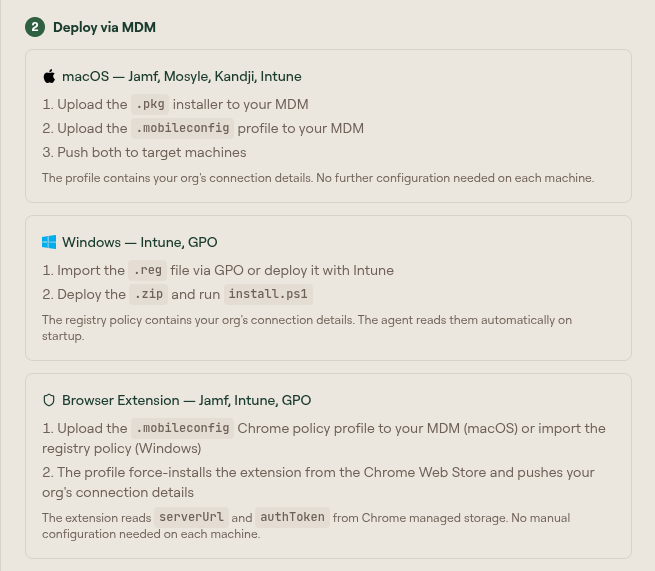
- Upload the configuration profile or registry policy to your MDM.
- Upload the installer package or installation script to your MDM.
- Scope the configuration and installer to a pilot group.
- Verify devices report to AI Discovery.
- Expand the scope to the rest of the target population.
For macOS, deploy the .mobileconfig profile before or with the .pkg installer so the agent can read its Willow connection details on startup.
For Windows, import the .reg policy before or during the install script so the scheduled task starts with the correct configuration.
For Linux, write /etc/mcp-s-scan/config.json with your Server URL and Auth Token before running install.sh. The installer keeps an existing config file and starts the mcp-s-scan systemd service when the config is filled in.
Connection details
The Scan Agent Setup modal shows Server URL and Auth Token under Connection Details.
These values are pre-filled in the downloaded config profile and registry file. Use them for manual or CLI-based installation, or when you need to convert the generated policy into another MDM format.
Do not edit the generated values unless Willow Support asks you to. Treat the auth token as sensitive.
Verify deployment
On a managed macOS device:
sudo launchctl print system/com.mcp-s-scan.agent
tail -n 50 /var/log/mcp-s-scan/agent-error.log
On a managed Windows device:
Get-ScheduledTask -TaskName "MCP-S-Scan Agent" | Select-Object State
Get-Content C:\ProgramData\mcp-s-scan\logs\agent.log -Tail 50
On a managed Linux device:
systemctl status mcp-s-scan
tail -n 50 /var/log/mcp-s-scan/agent-error.log
In Willow, open AI Discovery and confirm the pilot device appears with a recent last scan time.
Troubleshooting
| Symptom | Check |
|---|---|
| Device does not appear in Willow | Confirm the profile or registry policy was installed and contains the generated Willow connection values. |
| Agent installed but does not run | Check the launch daemon on macOS, the scheduled task on Windows, or the mcp-s-scan systemd service on Linux. |
| MDM shows install success but Willow has no scans | Review local agent logs and verify the device can reach your Willow Connect URL. |
| Only some users report findings | Confirm the MDM scope includes the expected devices and that the agent package was not limited to a test group. |