Some screenshots show mcp-s.com, which some existing organizations still use. New organizations use withwillow.ai. Copy the URLs shown in your own organization.
Guard Check Types
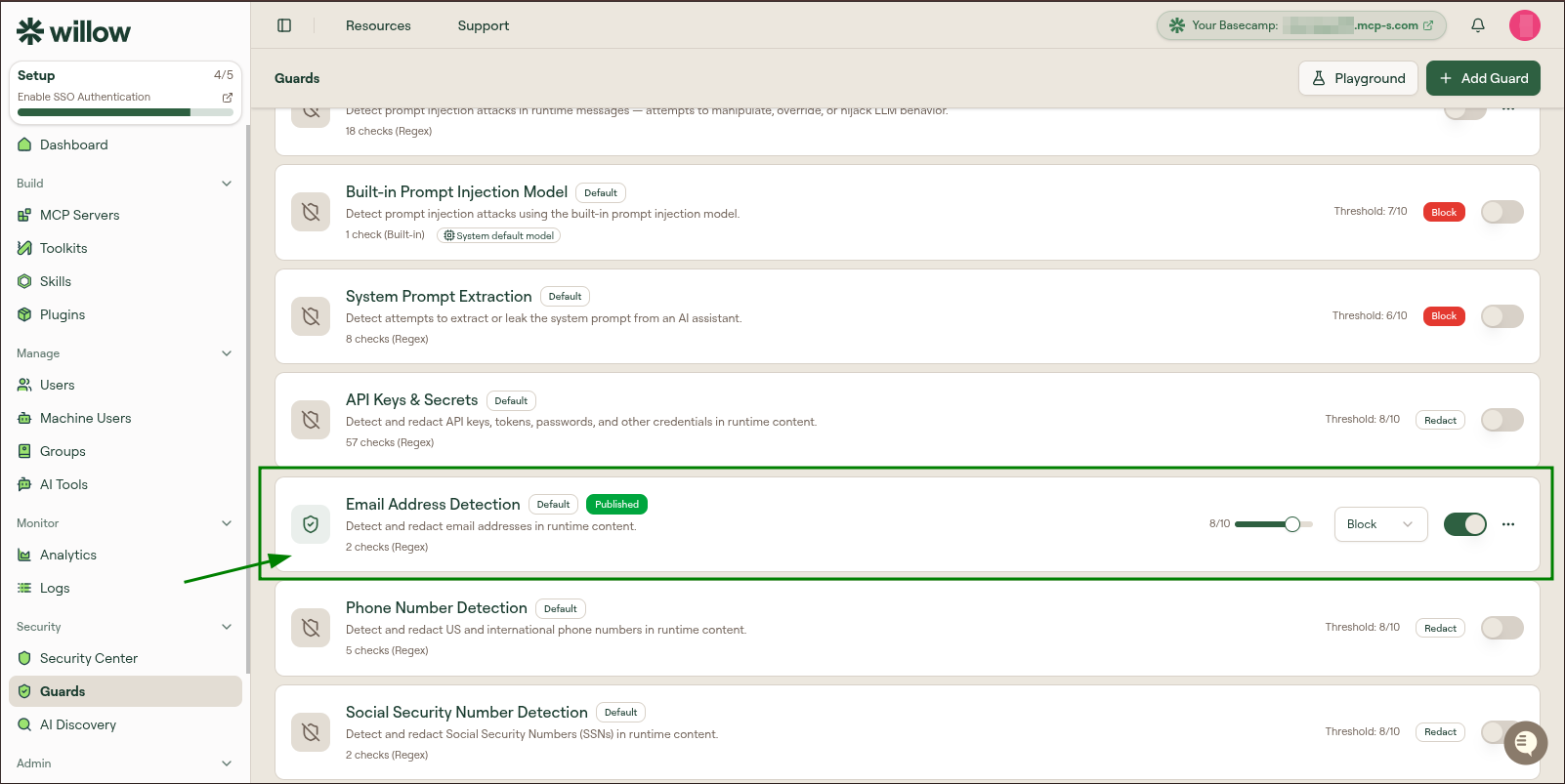
A guard is made up of one or more checks. Each check inspects content and, if it matches, contributes a score. The guard combines its checks into a single score out of 10 and fires when that score reaches the guard's threshold. You manage checks on the Checks tab of the guard editor.
Common fields
Every check, regardless of type, has:
| Field | Description |
|---|---|
| Name | A label for the check, shown in the checks list and in results |
| Type | One of the five types below |
| Certainty | The score this check contributes when it matches, on a 0-10 scale (for example, 10/10) |
| Enabled toggle | Turns the individual check on or off without removing it |
After editing checks you must select Save Checks for the changes to take effect.
The five types
| Type | What it does | Key configuration |
|---|---|---|
| Built-in | Uses one of Willow's managed detectors (secrets, PII, prompt injection, and so on) that run locally | Select the detector; no expression to write |
| Regex | Matches content against a regular expression | The pattern |
| JSONata | Evaluates a JSONata expression against structured payloads, for matching on specific fields or shapes | The expression |
| LLM | Sends the content to your connected model with a detection prompt and interprets the model's judgment | The prompt |
| Function | Runs custom logic for cases the other types cannot express | The function body |
Built-in
Built-in checks wrap Willow's own detectors, the same engines behind the built-in guards. They run on your infrastructure with no external API calls. Use them when a managed detector already covers what you need, such as API keys, credit card numbers, or SSNs.
Two built-in checks are backed by models that run in Willow's detection service. Both need that service deployed and reachable from the gateway; without it they score 0 and never fire. Willow SaaS runs it for you. On a hybrid deployment, deploy it next to run: see Detection service.
| Built-in check | What it does | Works with |
|---|---|---|
| Prompt Injection Detection | Scores content for attempts to hijack the assistant's instructions. Reports an explanation rather than a quote, so there is nothing for a redact guard to mask. | Block, Warning, Require Approval |
| Person Name Detection | Finds personal names and returns each name exactly as it appears, so a redact guard can mask them in place. Names are the one category of PII with no pattern to match, so a regex check cannot cover them. | Redact, Block, Warning, Require Approval |
Person Name Detection
Selecting this detector adds three settings:
| Setting | What it controls |
|---|---|
| Minimum Confidence | How sure the model must be before a name counts. Lower values catch more names and more false positives. The default suits most content. |
| Never Redact | One entry per line. The model reads product and company names as people, so list your own product, company, and team names here to keep them out of the results. |
| Replace With | The placeholder that replaces each name, for example [REDACTED-NAME]. |
Capitalisation does not affect detection: sarah connor and SARAH CONNOR are found just as Sarah Connor is, and every casing present in the content is masked.
Unless you attach it explicitly, the built-in Person Name Detection guard runs on tool responses only. A name in a request is usually the value the caller is searching on, so masking it there breaks the tool call instead of protecting anything. Attach the guard to set a direction of your own.
The guard's threshold applies to this detector: names are only masked when the model's confidence clears it. Minimum Confidence decides which names the detector reports at all, and the threshold decides whether the guard acts on them, so leaving the threshold above the confidence floor means some detections are reported but never masked.
Because the detector is a model rather than a pattern, tune it against real payloads in the Playground before enabling the guard. Two cases make a redact guard fall back to its redact fallback action, which blocks by default rather than letting a name through: a name it cannot mask verbatim, and content too long for it to scan in full, where masking only the part it reached would return a payload that looks scrubbed but is not.
Regex
A Regex check matches content against a pattern. Regex checks are deterministic: content that matches typically scores at the check's certainty (often 10/10), and content that does not match scores 0. They are ideal for well-defined formats like email addresses, IP addresses, or a specific token shape.
JSONata
A JSONata check evaluates an expression against the structured tool payload rather than raw text. Use it to match on a particular field, a nested value, or the shape of an argument, for example flagging a call only when a specific parameter is present.
LLM
An LLM check describes what to detect in natural language and lets your connected model judge the content. The editor provides a Name, a certainty score, and an LLM Prompt. Use LLM checks for fuzzy or context-dependent risks that a pattern cannot capture, such as "content that describes how to exfiltrate data."
LLM checks call your configured AI provider. They require Bring Your Own AI to be enabled under Settings › AI Settings.
An LLM check on a runtime guard adds model latency to every message and tool call it runs on, and the editor warns about this. Prefer a built-in, regex, or JSONata check for runtime guards, and keep LLM checks for build-time guards. When you do need one at runtime, set its optional Regex Precondition so the model only runs on content that could matter, for example \b(wire|transfer|iban)\b. The pattern is case-insensitive. Content that does not match skips the LLM, scores 0, and saves the latency and cost. An empty precondition always runs the model, and so does a pattern that is not a valid regular expression. You can also scope the guard to the MCP servers, groups, or agents where it is needed.
Function
A Function check runs custom code against the content, for logic that none of the other types express cleanly. Use it as an escape hatch when you need bespoke matching.
How checks combine
The guard evaluates each enabled check against the content. The guard's overall score is the highest check score, so a single strong match is enough to reach the threshold. Each matched check appears in the result with its own score, which the Playground shows in the per-check breakdown.
For example, an Email Address Detection guard with two checks (Email Address and Mailto Link) scoring 10 and 0 on the input mail@example.com produces a guard score of 10/10, which meets an 8/10 threshold and fires.
Add Check with AI
Instead of writing a check by hand, select Add with AI on the Checks tab. The modal asks what the check should detect and offers a Check Type dropdown:
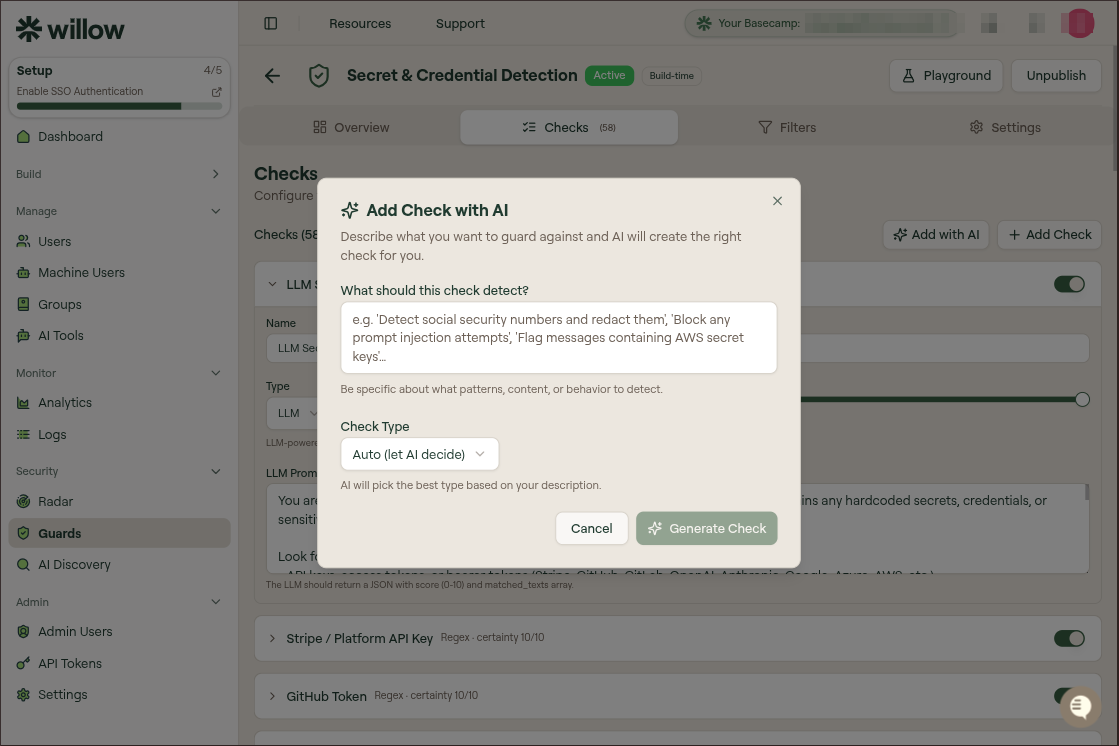
- Auto (let AI decide) lets Willow pick the most suitable type.
- Choosing Regex, LLM, JSONata, or Function constrains the generated check to that type.
Select Generate Check and Willow creates a check from your description. It appears in the checks list, where you can refine its fields and certainty before saving.
Add with AI is only available once Bring Your Own AI is configured under Settings › AI Settings. Without a connected AI provider the option does not appear, and you add checks manually instead. The same applies to LLM checks, which call your provider each time they run.