Guard Setup & Coverage
Guards only protect the surfaces that have been wired to them. A guard that blocks secrets in MCP traffic does nothing about the same secret pasted into claude.ai, unless that surface is connected too.
Guard Setup & Coverage is where you see which surfaces are connected and start the setup for the ones that are not. Open it with Setup & Coverage in the Security > Guards header.
Read the coverage banner
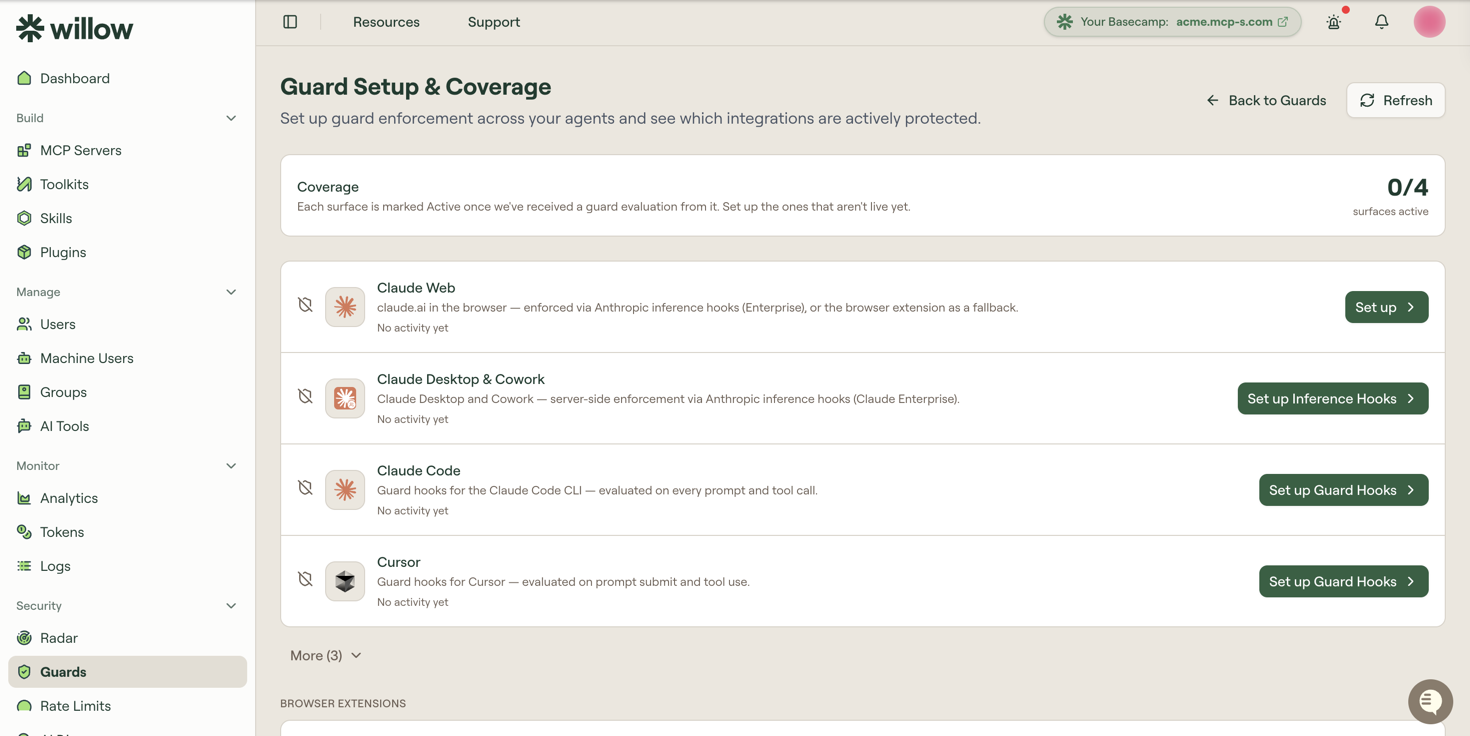
The banner at the top counts how many surfaces are live, out of the surfaces your organization has approved:
Each surface is marked Active once we've received a guard evaluation from it. Set up the ones that aren't live yet.
Coverage is measured from real traffic, not from configuration. A surface counts as Active only once Willow has received a guard evaluation from it, so a surface you have configured but nobody has used yet still reads as Not detected. Each row also carries its own last-activity line, which reads No activity yet until the first evaluation arrives.
Because the count reflects observed traffic, it lags a rollout. Refresh re-fetches it after you have tested a newly configured surface yourself.
The surfaces
Each row names a surface, the mechanism that enforces guards on it, and the action that sets it up.
| Surface | Enforced by | Action |
|---|---|---|
| Claude Web | Anthropic inference hooks on Claude Enterprise, or the browser extension as a fallback | Set up |
| Claude Desktop & Cowork | Server-side enforcement through Anthropic inference hooks, which needs Claude Enterprise | Set up Inference Hooks |
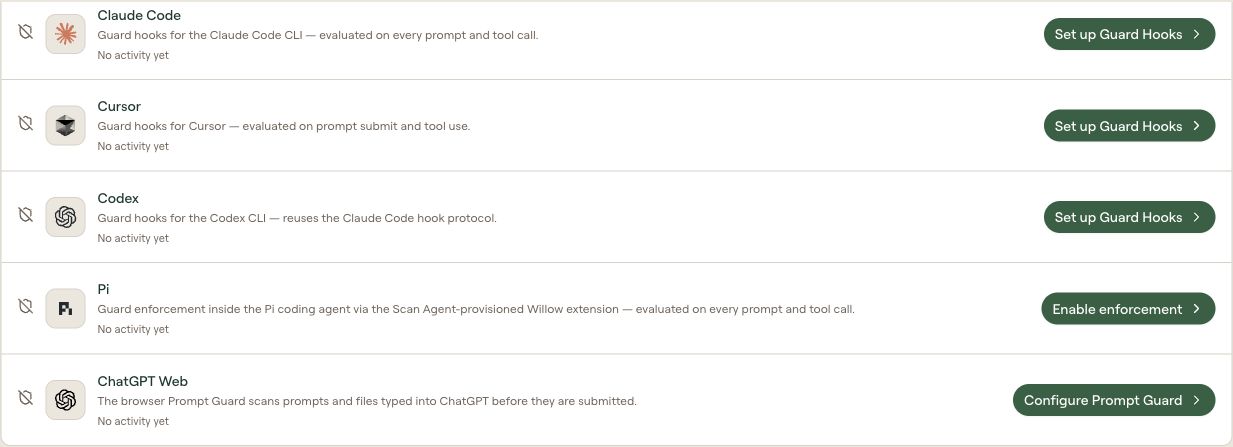
| Claude Code | Guard hooks for the Claude Code CLI, evaluated on every prompt and tool call | Set up Guard Hooks |
| Cursor | Guard hooks, evaluated on prompt submit and tool use | Set up Guard Hooks |
| Codex | Guard hooks, reusing the Claude Code hook protocol | Set up Guard Hooks |
| Pi | A Willow extension provisioned by the Scan Agent, evaluating prompts and tool calls inside the Pi coding agent | Enable enforcement |
| Gemini Web | The browser Prompt Guard, which scans prompts and files before they are submitted | Configure Prompt Guard |
| ChatGPT Web | The browser Prompt Guard | Configure Prompt Guard |
Surfaces your organization has not approved are collapsed behind More (N) and badged Not approved. They can still be set up from here — the badge tells you the surface is not currently sanctioned for use, not that enforcement is unavailable for it.
Claude Web has two paths
Claude Web is the one surface with a choice to make, so Set up opens a Protect Claude Web dialog rather than going straight to a setup page:
| Path | Use it when |
|---|---|
| Claude Enterprise (recommended) | You are on Claude Enterprise. Anthropic inference hooks enforce server-side across claude.ai and Cowork, org-wide, with nothing to install per user. |
| Browser extension | You are not on Claude Enterprise. The Prompt Guard scans prompts in the browser instead, and is installed per user. |
Prefer the Enterprise path where you can have it: it covers every user without a per-machine rollout, and it cannot be removed by the person it applies to.
Browser extensions
Below the surfaces, a Browser Extensions section covers extensions that guard a browser agent rather than a chat surface.
Claude Chrome Extension Guard governs the Claude in Chrome browser agent, gating the HTTP requests it makes. Configure opens the Claude Guard page, where you install the extension and download an MDM profile that force-installs it and pushes allow and block rules to managed browsers. See Claude Guard for Claude in Chrome for the full setup.
What to do next
- Guard Hooks: Claude Code, Cursor, and Codex
- Inference Hooks: Claude Enterprise surfaces
- Prompt Guard: ChatGPT, Claude, Gemini, Microsoft 365 Copilot, and DeepSeek in the browser
- Guards: the guards these surfaces enforce