Log Settings
Log Settings controls what Willow writes to your logs, how long it keeps the payloads, and where it forwards them.
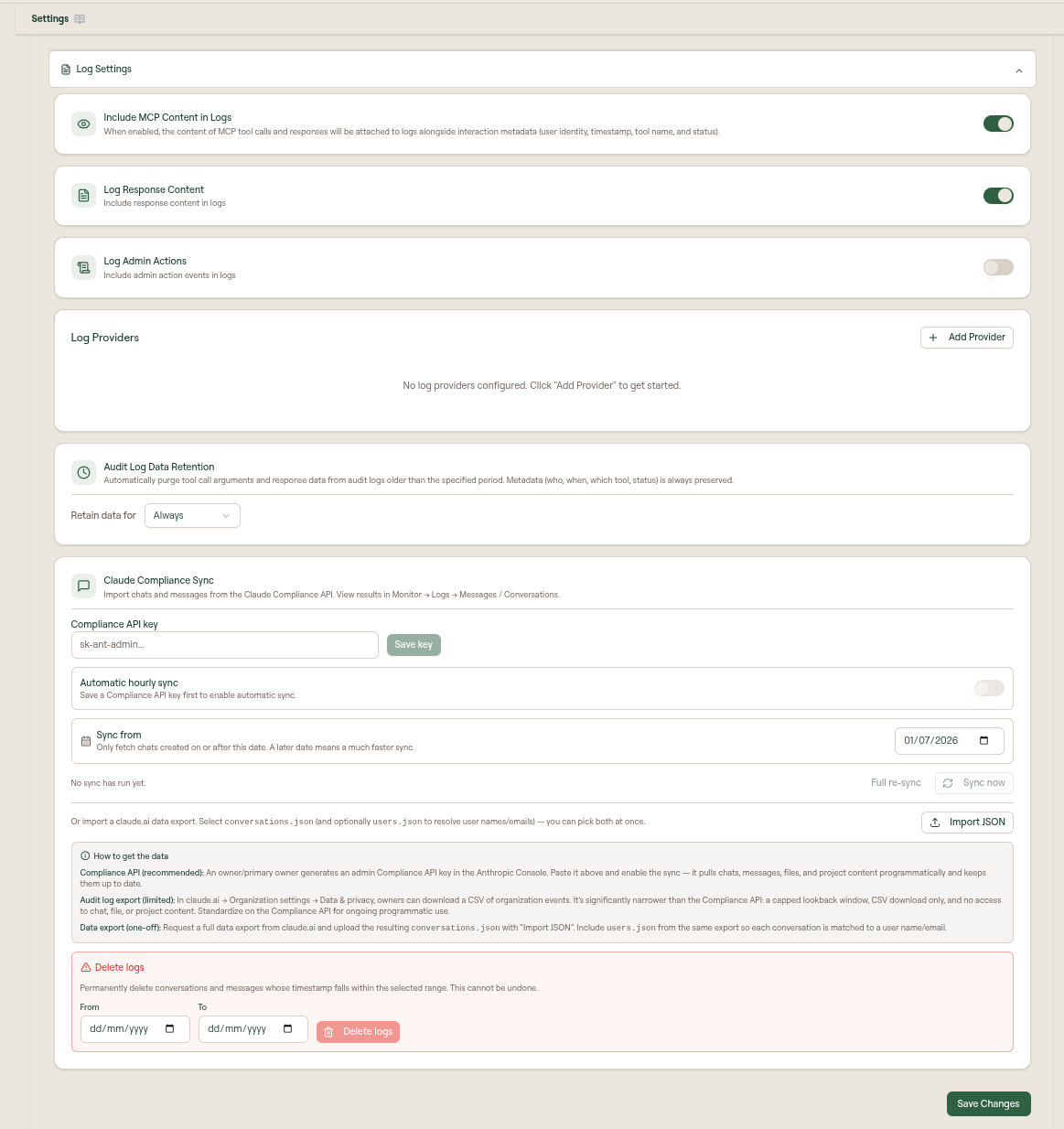
This page covers the settings themselves. To read and search the logs, see Logs under Monitor.
What you can do
- Choose whether captured content, responses, and admin actions are written to logs
- Forward logs to external providers, using the log schemas to parse them
- Send agent OpenTelemetry through your collector before Willow (OTLP proxy)
- Set audit log data retention
- Import or sync Claude conversations through Claude Compliance Sync
- Delete synced conversation logs by date range
Log settings
Open Settings in the admin sidebar, then expand Log Settings.
| Setting | What it controls |
|---|---|
| Log Content | One switch for every place Willow captures content: MCP tool call arguments, agent prompts and transcripts (telemetry and Claude Compliance Sync), and the text guards scan in hook and Prompt Guard evaluations. When it is off, only metadata is stored — who, when, which tool or guard, and the verdict. |
| Log Responses | Also stores what came back: MCP tool responses, assistant replies, and tool result bodies. Requires Log Content. |
| Log Passed Evaluations | Records a message in Monitor → Messages for every guard evaluation — IDE guard hooks and browser Prompt Guard alike — even when nothing is triggered. Off means only flagged evaluations (block, warn, ask, redact) are logged. Passing evaluations never send alerts. |
| Log Admin Actions | Includes admin action events in logs. |
| Collect Agent Telemetry | Turns on OpenTelemetry collection per agent (Claude Code, Codex, Cursor, and others). Willow rejects an agent's telemetry while its switch is off. Cowork uses the Claude Code switch. See Analytics Data Sources. |
| Log Providers | Adds external log destinations such as Splunk, Grafana Loki, Coralogix, CrowdStrike, Panther, Google SecOps, AWS S3, or a webhook. |
| OTLP proxy | Sends Claude Code, Codex, Cowork, and Scan Agent telemetry to your collector first. See OTLP proxy. Distinct from OTLP Export, which copies data after Willow ingest. |
| Audit Log Data Retention | Purges tool call arguments and response data from audit logs older than the selected period. Metadata such as who, when, which tool, and status is preserved. |
| Claude Compliance Sync | Imports chats and messages from the Claude Compliance API or a one-off claude.ai data export. |
After changing settings, select Save Changes.
Content logging is one org-wide decision
Log Content applies to every collection surface, so there is no per-feature content toggle to keep in sync. New organizations start with it on. While it is off, Guard Hooks, Prompt Guard, agent telemetry, and Claude Compliance Sync all show a notice explaining that the content they would display is not being stored — detections, verdicts, token counts, and thread structure are recorded either way, so those features keep working on metadata alone.
Log Passed Evaluations works the same way: it is a single decision about audit volume that every guard surface obeys, rather than a toggle on each guard page. The guard pages link back here and note when only flagged evaluations are being recorded.
Audit log data retention
Use Audit Log Data Retention to automatically purge tool call arguments and response data after a selected period. Set Retain data for to Always if your organization needs to keep full audit log payloads indefinitely.
Retention affects stored argument and response data. Audit metadata remains available for review and reporting.
Log providers
You can forward application logs to an external provider for centralized observability. Each provider has its own page covering prerequisites, configuration fields, and troubleshooting:
| Provider | Use it when |
|---|---|
| Splunk (HEC) | You run Splunk and can enable the HTTP Event Collector. |
| Grafana Loki | You query logs with LogQL in Grafana. |
| Coralogix | You use Coralogix for full-stack observability. |
| CrowdStrike | You run Falcon LogScale or NG-SIEM. |
| Panther | You use Panther and ingest via an HTTP log source. |
| Google SecOps | You use Google Security Operations (Chronicle). |
| AWS S3 | Your SIEM reads from a bucket you own, including Panther's S3 data transport. |
| Webhook | No native provider fits, and you want a custom pipeline. |
To add one, open Admin > Settings > Log Settings, then select Add Provider. Choose the provider type and fill in its required fields.
Anonymous Mode
Available on all providers. When enabled, only aggregated and statistical data is forwarded: sensitive fields such as request data and user details are excluded from the payload.
Use this if you need basic operational telemetry without exposing PII.
Combine Anonymous Mode with provider-side redaction rules for defense in depth.
Log schemas
Every event Willow forwards is one JSON object. There are three record types, and you can tell them apart by their fields:
| Record type | How to recognize it | Event categories |
|---|---|---|
| Audit log | Has user_id and a data object. action says what happened. | Tool Calls, Guard Catches, Prompts & Commands, Skills, Sessions & Connections, Connector Authentication, Webhooks, Agent Telemetry |
| Conversation message | record_type is "conversation_message". | Conversations & Messages |
| Admin action | Has admin_email and a payload object. | Admin Actions |
Each provider wraps the record in its own envelope. See Provider envelopes for where the record sits in each request.
The examples below show common fields. Optional fields are left out when they have no value. When Log Content is off, captured content such as tool arguments and response and message text is not stored, so it is not forwarded either. When Log Responses is off, tool responses and assistant replies are left out.
Provider envelopes
| Provider | Request shape | Where the record is |
|---|---|---|
| Splunk (HEC) | HEC event with sourcetype: "audit_log", source: "audit-logs", and index mcp-s unless you set one. | event.message |
| Grafana Loki | Push API stream with labels app="mcp-s-db-service", level="info", action, org_id, plus your custom labels. | The log line, as a JSON string |
| Coralogix | /logs/v1/singles entry with applicationName (default mcp-s), subsystemName (default audit-logs), and severity: 3. | text, as a JSON string |
| CrowdStrike | HEC-compatible event with sourcetype: "audit_log", source: "audit-logs", and fields: { action, org_id }. | event |
| Panther | The record itself is the request body. | The whole body |
| Google SecOps | logs:import request. logEntryTime is the record's created_at, and environmentNamespace and labels come from your settings. | inlineSource.logs[].data, base64-encoded JSON |
| AWS S3 | One object per event at <prefix>/org_id=<org_id>/YYYY/MM/DD/HH/<epoch_ms>-<uuid>.json, sent as newline-delimited JSON. | The object body |
| Webhook | { "timestamp": "...", "type": "audit_log", "data": { ... } }. type is always audit_log, so use the record fields above to tell record types apart. | data |
If an event is larger than the provider's size limit, Willow shortens its longest string values so the JSON still parses. Shortened values end with ...[truncated], and the record gets "is_truncated": true.
Audit log fields
These top-level fields appear on every audit log record. The action-specific details are in data, described in the sections below.
| Field | Description |
|---|---|
id | Audit log ID (UUID). |
org_id | Organization ID. |
user_id | Acting user. System events, such as webhooks and unattributed telemetry, use 00000000-0000-0000-0000-000000000000. |
user | { id, name, email } of the acting user. System events use the name System. |
action | Event type, for example tool_call or guard_check. |
data | Action-specific payload. |
mcp_client | Client that made the request, for example cursor or claude-code. |
toolkit_slug | Toolkit the request came through, if any. |
transport | http or stdio. |
token_count | Total tokens counted for the event. |
session_id, event_name, otel_source, device_id | Set on events that came from agent telemetry. otel_source is claude_code, codex, cursor, or pi. |
created_at, updated_at | ISO 8601 timestamps. |
Audit logs also carry flat copies of common data values, such as tool_call_mcp, tool_call_tool, tool_call_success, guardrails_logs_action, guardrails_logs_guards, and performance_total_time, so you can filter on them without parsing data.
data.gateway records which Willow gateway handled the request: { id, type, label, url, is_default }.
Anonymous Mode: user is removed and data is replaced with { "error": { "type", "statusCode", "code" } } when the event failed, or dropped entirely when it succeeded. Top-level fields stay.
Tool calls
Sent for tool_call (an MCP tool call through the gateway) and agent_tool_call (a tool call an agent reported through telemetry, including native tools such as Bash and Edit).
{
  "id": "5b0e7a52-2f1c-4d8e-9a37-0c6f1d2e8b41",
  "org_id": "0f6c1c1e-7d2a-4b1e-8f0a-3c5b9e7d2a10",
  "user_id": "8d3f2a61-4b7c-4e9d-a1f0-6b2c9e5d7a34",
  "user": { "id": "8d3f2a61-4b7c-4e9d-a1f0-6b2c9e5d7a34", "name": "Dana Levi", "email": "dana@acme.com" },
  "action": "tool_call",
  "mcp_client": "cursor",
  "transport": "http",
  "token_count": 970,
  "tool_call_mcp": "github",
  "tool_call_tool": "create_issue",
  "tool_call_success": true,
  "performance_total_time": 412,
  "data": {
    "mcp": "github",
    "tool": "create_issue",
    "success": true,
    "arguments": { "settings": {}, "arguments": { "repo": "acme/api", "title": "Fix login timeout" } },
    "response": { "content": [{ "type": "text", "text": "Created issue #1423" }] },
    "guardrails": [],
    "performance": { "total": 412, "toolCall": 356 },
    "token_count": { "request": 120, "response": 850 },
    "gateway": { "type": "withwillow", "url": "https://acme.run.withwillow.ai" }
  },
  "created_at": "2026-09-29T09:12:44.118Z",
  "updated_at": "2026-09-29T09:12:44.118Z"
}
data field | Description |
|---|---|
mcp, tool | Integration slug and tool name. |
success | Whether the call succeeded. |
arguments | { settings, arguments } passed to the tool. |
response | Tool response. |
error | Error details when the call failed, for example { "code": "RATE_LIMITED" }. |
guardrails | Guards that ran on the call. See Guard catches. |
performance | Timings in milliseconds. total is the end-to-end time. |
token_count | { request, response } token counts. |
auth_type, auth_user, background_agent | Set when a background agent made the call. |
call_path | How the call left the gateway: kind (proxy, rest, or local), the MCP auth type, and the REST method and URL. Never contains secrets. |
An agent_tool_call has data.tool, data.mcp, data.success, data.decision (the agent's permission decision), data.input, data.content (the tool result), data.event_name, and data.known_gateway. known_gateway is false when an MCP call bypassed your Willow gateways.
Guard catches
Sent for guard_check events, and for any other audit log where a guard blocked, warned, or redacted. A blocked tool call reaches providers that selected either Tool Calls or Guard Catches.
{
  "id": "c2a91e07-6d3b-4f58-b0e4-19a7c5d2f863",
  "org_id": "0f6c1c1e-7d2a-4b1e-8f0a-3c5b9e7d2a10",
  "user_id": "8d3f2a61-4b7c-4e9d-a1f0-6b2c9e5d7a34",
  "user": { "id": "8d3f2a61-4b7c-4e9d-a1f0-6b2c9e5d7a34", "name": "Dana Levi", "email": "dana@acme.com" },
  "action": "guard_check",
  "guard_check_scope": "buildtime",
  "guardrails_logs_action": "block",
  "guardrails_logs_guards": ["secrets-detection"],
  "data": {
    "scope": "buildtime",
    "entity_type": "skill",
    "entity_name": "deploy-helper",
    "source": "Device scan",
    "passed": false,
    "guardrails": [
      {
        "action": "block",
        "stage": "input",
        "code": "GUARDS_BLOCKED",
        "details": { "guard_slug": "secrets-detection", "guard_name": "Secrets Detection" }
      }
    ]
  },
  "created_at": "2026-09-29T09:14:02.551Z",
  "updated_at": "2026-09-29T09:14:02.551Z"
}
Each guardrails entry has:
| Field | Description |
|---|---|
action | block, warn, transform (redacted), or allow. |
stage | input (before the tool ran) or output (on the response). |
code | Machine-readable reason, for example GUARDS_BLOCKED, GUARDS_WARNING, or GUARDS_TRANSFORMED. |
details | Guard-specific details, including guard_slug and guard_name. Matched content is removed when Log Content is off. |
A guard_check also has data.scope (buildtime for publishes and device scans, runtime otherwise), data.entity_type, data.entity_name, data.source, and data.passed.
Guard hook and Prompt Guard evaluations are recorded as conversation messages with a guardrails array. They are sent under Conversations & Messages.
Prompts and commands
Sent for get_prompt (an MCP prompt or toolkit command was invoked) and add_command (a command was installed).
{
  "id": "e4d07b93-1a2c-4c6f-8e15-7b3a9d0c2f58",
  "org_id": "0f6c1c1e-7d2a-4b1e-8f0a-3c5b9e7d2a10",
  "user_id": "8d3f2a61-4b7c-4e9d-a1f0-6b2c9e5d7a34",
  "user": { "id": "8d3f2a61-4b7c-4e9d-a1f0-6b2c9e5d7a34", "name": "Dana Levi", "email": "dana@acme.com" },
  "action": "get_prompt",
  "mcp_client": "claude-code",
  "tool_call_mcp": "engineering",
  "tool_call_tool": "release-notes",
  "tool_call_success": true,
  "data": {
    "source": "toolkit",
    "toolkit": "engineering",
    "prompt": "release-notes",
    "success": true,
    "arguments": { "version": "2.4.0" }
  },
  "created_at": "2026-09-29T09:20:11.004Z",
  "updated_at": "2026-09-29T09:20:11.004Z"
}
data.source is mcp (then data.mcp is set) or toolkit (then data.toolkit is set). add_command carries only data.error when the install failed.
Conversations and messages
Sent for each user prompt and assistant reply captured from agents (telemetry and guard hooks), Claude Compliance Sync, and browser Prompt Guard. Tool steps are not sent here because they already arrive as agent_tool_call audit logs.
{
  "id": "9a7c3e10-5f2b-4d84-a6e9-2c1b8f0d7e35",
  "org_id": "0f6c1c1e-7d2a-4b1e-8f0a-3c5b9e7d2a10",
  "record_type": "conversation_message",
  "action": "conversation.user",
  "conversation_id": "3e5f7a91-8c2d-4b60-9f13-a4d6e8b0c217",
  "external_id": "msg_01HZX9",
  "provider": "claude",
  "source": "otel",
  "role": "user",
  "model": "claude-opus-4-7",
  "text": "Summarize the open incidents for the payments service",
  "content": [{ "type": "text", "text": "Summarize the open incidents for the payments service" }],
  "guardrails": [],
  "origins": ["otel", "guard-hooks"],
  "event_name": "UserPromptSubmit",
  "source_user_email": "dana@acme.com",
  "token_count": 14,
  "has_files": false,
  "file_count": 0,
  "has_tool_use": false,
  "has_guardrails": false,
  "user": { "id": "8d3f2a61-4b7c-4e9d-a1f0-6b2c9e5d7a34", "name": "Dana Levi", "email": "dana@acme.com" },
  "source_created_at": "2026-09-29T09:25:30.000Z",
  "created_at": "2026-09-29T09:25:31.402Z",
  "updated_at": "2026-09-29T09:25:31.402Z"
}
| Field | Description |
|---|---|
action | conversation.user or conversation.assistant. |
provider | claude, codex, cursor, pi, chatgpt, or gemini. |
source | How the message was collected: otel, api, export, or extension. |
role | user or assistant. |
text, content | Message text, and the raw content blocks (text, tool_use, tool_result). |
guardrails | Guards that evaluated the message, in the same shape as Guard catches. |
origins | Pipelines that reported the message: otel, guard-hooks, compliance, extension. |
source_user_id, source_user_email, source_user_name | Identity as reported by the source, kept even when no Willow user matched. |
billed_input_tokens, billed_output_tokens | Billed tokens, set on assistant replies. |
Anonymous Mode: text, content, guardrails, and user are removed. Routing metadata such as role, provider, counts, and timestamps stays.
Skills
Sent for add_skill, when a skill is added to an agent.
{
  "id": "1f8e2d47-3b6a-4c09-9d52-e7a0b4c8f613",
  "org_id": "0f6c1c1e-7d2a-4b1e-8f0a-3c5b9e7d2a10",
  "user_id": "8d3f2a61-4b7c-4e9d-a1f0-6b2c9e5d7a34",
  "user": { "id": "8d3f2a61-4b7c-4e9d-a1f0-6b2c9e5d7a34", "name": "Dana Levi", "email": "dana@acme.com" },
  "action": "add_skill",
  "add_skill_name": "pdf-report",
  "add_skill_agent_type": "claude-code",
  "data": { "skill_name": "pdf-report", "agent_type": "claude-code" },
  "created_at": "2026-09-29T09:31:08.772Z",
  "updated_at": "2026-09-29T09:31:08.772Z"
}
data.error is set when adding the skill failed.
Sessions and connections
Sent for init (an MCP session started and listed its tools) and connect (a client exchanged an OAuth token with Willow).
{
  "id": "7c4b1a93-0e5d-4f27-8b36-d9a2e1f0c584",
  "org_id": "0f6c1c1e-7d2a-4b1e-8f0a-3c5b9e7d2a10",
  "user_id": "8d3f2a61-4b7c-4e9d-a1f0-6b2c9e5d7a34",
  "user": { "id": "8d3f2a61-4b7c-4e9d-a1f0-6b2c9e5d7a34", "name": "Dana Levi", "email": "dana@acme.com" },
  "action": "init",
  "mcp_client": "cursor",
  "transport": "http",
  "init_tools": ["github__create_issue", "github__list_pull_requests"],
  "performance_total_time": 238,
  "data": {
    "tools": ["github__create_issue", "github__list_pull_requests"],
    "performance": { "total": 238 }
  },
  "created_at": "2026-09-29T09:02:15.339Z",
  "updated_at": "2026-09-29T09:02:15.339Z"
}
A connect has redirect_uri and oauth_client_id at the top level, and in data:
| Field | Description |
|---|---|
grant_type | authorization_code, refresh_token, or urn:ietf:params:oauth:grant-type:jwt-bearer. |
success | Whether tokens were issued. |
error_code | OAuth error such as invalid_grant, when success is false. |
idp_subject, idp_email | Identity from a verified Okta Cross App Access assertion. |
fix | What an admin should change to fix a rejected sign-in. |
Connector authentication
Sent for connector_auth: each step of a user connecting an integration account, and token refresh failures.
{
  "id": "b6e3d8a1-2c7f-4a95-8e04-f1d9c3b7a260",
  "org_id": "0f6c1c1e-7d2a-4b1e-8f0a-3c5b9e7d2a10",
  "user_id": "8d3f2a61-4b7c-4e9d-a1f0-6b2c9e5d7a34",
  "user": { "id": "8d3f2a61-4b7c-4e9d-a1f0-6b2c9e5d7a34", "name": "Dana Levi", "email": "dana@acme.com" },
  "action": "connector_auth",
  "data": {
    "integration_slug": "jira",
    "connector_slug": "jira",
    "auth_type": "oauth",
    "step": "code_exchange",
    "success": false,
    "error_code": "invalid_grant"
  },
  "created_at": "2026-09-29T09:40:52.917Z",
  "updated_at": "2026-09-29T09:40:52.917Z"
}
data.step is one of init, code_exchange, credentials_mapping, credentials_save, installation, api_key_save, discovery, or refresh.
Webhooks
Sent for webhook: an inbound provider webhook and the workflows it triggered. Webhooks are system events, so user.name is System.
{
  "id": "d1a5f9c3-7e2b-4086-b4d7-3c8e0a6f2b19",
  "org_id": "0f6c1c1e-7d2a-4b1e-8f0a-3c5b9e7d2a10",
  "user_id": "00000000-0000-0000-0000-000000000000",
  "user": { "id": "00000000-0000-0000-0000-000000000000", "name": "System", "email": "" },
  "action": "webhook",
  "tool_call_mcp": "github",
  "tool_call_success": true,
  "data": {
    "integration_slug": "github",
    "event": "pull_request.opened",
    "triggers": ["pull_request_opened"],
    "verification": "verified",
    "success": true,
    "workflows": [
      {
        "id": "4e7a2c90-1b5d-4f38-a6e2-9d0c3b8f1a57",
        "name": "PR review agent",
        "trigger": "pull_request_opened",
        "condition_matched": true,
        "action_type": "background-agent",
        "agent_name": "Reviewer",
        "session_created": true,
        "success": true
      }
    ],
    "headers": { "x-github-event": "pull_request" },
    "body": { "action": "opened", "number": 1423 }
  },
  "created_at": "2026-09-29T09:44:07.260Z",
  "updated_at": "2026-09-29T09:44:07.260Z"
}
data.verification is verified, failed, or skipped. Each workflow's action_type is forward-url (with action_url and status) or background-agent (with the agent and session it ran in).
Agent telemetry
Sent for agent_event: any OpenTelemetry log event an agent reports that isn't a tool call or a message, such as api_request and api_error. The raw event is kept so no telemetry is lost.
{
  "id": "a3f7c1e9-4d2b-4e68-9b05-6c8d2f0a7e14",
  "org_id": "0f6c1c1e-7d2a-4b1e-8f0a-3c5b9e7d2a10",
  "user_id": "8d3f2a61-4b7c-4e9d-a1f0-6b2c9e5d7a34",
  "user": { "id": "8d3f2a61-4b7c-4e9d-a1f0-6b2c9e5d7a34", "name": "Dana Levi", "email": "dana@acme.com" },
  "action": "agent_event",
  "otel_source": "claude_code",
  "event_name": "api_request",
  "session_id": "5d1e8b2a-9c4f-4a07-b3e6-0f7d2c9a1b48",
  "device_id": "MAC-7F3A91",
  "data": {
    "event_name": "api_request",
    "severity": "INFO",
    "attributes": { "model": "claude-opus-4-7", "input_tokens": 1820, "output_tokens": 412, "duration_ms": 3104 }
  },
  "created_at": "2026-09-29T09:50:19.683Z",
  "updated_at": "2026-09-29T09:50:19.683Z"
}
data.attributes holds the event's OpenTelemetry attributes as the agent sent them. data.body holds the log body, when there is one.
Admin actions
Sent for configuration changes made in the admin dashboard. Log Admin Actions must also be on.
{
  "id": "f0c6a2d8-3e9b-4175-8a4c-b2e7d1f9c063",
  "org_id": "0f6c1c1e-7d2a-4b1e-8f0a-3c5b9e7d2a10",
  "admin_id": "2b9d4f61-7a3c-4e08-95d1-c6e0a8b3f725",
  "admin_email": "admin@acme.com",
  "action": "user.patch",
  "payload": {
    "id": "8d3f2a61-4b7c-4e9d-a1f0-6b2c9e5d7a34",
    "role": "member",
    "_resolved": {
      "8d3f2a61-4b7c-4e9d-a1f0-6b2c9e5d7a34": { "type": "user", "name": "Dana Levi", "email": "dana@acme.com" }
    }
  },
  "created_at": "2026-09-29T10:03:47.215Z",
  "updated_at": "2026-09-29T10:03:47.215Z"
}
| Field | Description |
|---|---|
admin_id, admin_email | The admin who made the change. |
action | What changed, as <entity>.<operation>, for example user.patch or vibeApp.create. |
payload | The request the admin sent. |
payload._resolved | Names, slugs, and emails for the IDs in payload, keyed by ID, so the event is readable without a lookup. |
Admin action events are sent in full, including when Anonymous Mode is on.
Other events
These audit log actions have no category, so they are sent to every provider regardless of its event selection:
| Action | data fields |
|---|---|
proxy_server | mcp, reason (for example connection_closed_unexpected), error. An upstream MCP server connection closed without Willow closing it. |
backgroundAgent.gitToken | agent_id, repo. A background agent received a Git Proxy token. |
backgroundAgent.gitPullRequest | agent_id, repo, head, base, number. A background agent opened a pull request through Git Proxy. |
Send a test log on a provider sends an event with "action": "test", data.test: true, and a user named mcp-s Test.
Best practices
- Use least-privilege credentials for any outbound log sink.
- Add provider-side retention and lifecycle rules to control storage costs.
- Tag logs with
env(for exampleproductionorstaging) to separate flows. - Validate network egress and firewall rules from your deployment to the provider.
- Test provider connectivity before relying on it for compliance.
- Use Anonymous Mode when forwarding to less-trusted or shared environments.
Troubleshooting
- No logs appearing: verify the provider credentials and URL, and confirm outbound egress is allowed. See the provider's own page for specific checks.
- Errors when saving: ensure every required field is filled for the selected provider, and that URLs include the protocol (
https://). - Timeout errors: webhook and Coralogix requests time out after 5 seconds. Ensure your endpoint or region is reachable with low latency.
Related
- Logs: view and search the logs themselves
- OTLP proxy: send agent telemetry to your collector before Willow
- Claude Compliance Sync
- Alert rules