Deploy an Agent
Creating an agent gives it credentials and a status, not a presence on its platform. Deploying is what puts it there. Open the agent from Manage > Machine Users > Background Agents, then select Deploy in the detail-page header.
What deploying does
Deploying pushes the agent to its platform. It creates or updates the agent definition there, uploads the enabled skills, and stores fresh gateway credentials on the platform side.
On Willow Agents and Claude Managed Agents, deploying also sets up git for an agent that has Git repositories configured. Deploy again after changing that list.
It also rotates the agent's secret, because writing fresh credentials to the platform issues a new one. Any plaintext secret you were holding stops working after a deploy. See Authentication.
Where the action is
| Where | What it reads |
|---|---|
| The detail-page header | Deploy, or Deploy changes once the agent has edits that have not reached its platform. |
| Settings > Deployment & Sync | The deployment card for the agent's platform, for example Deploy to Willow Agents before the first deploy. On Willow Agents the card also shows the session credit balance. |
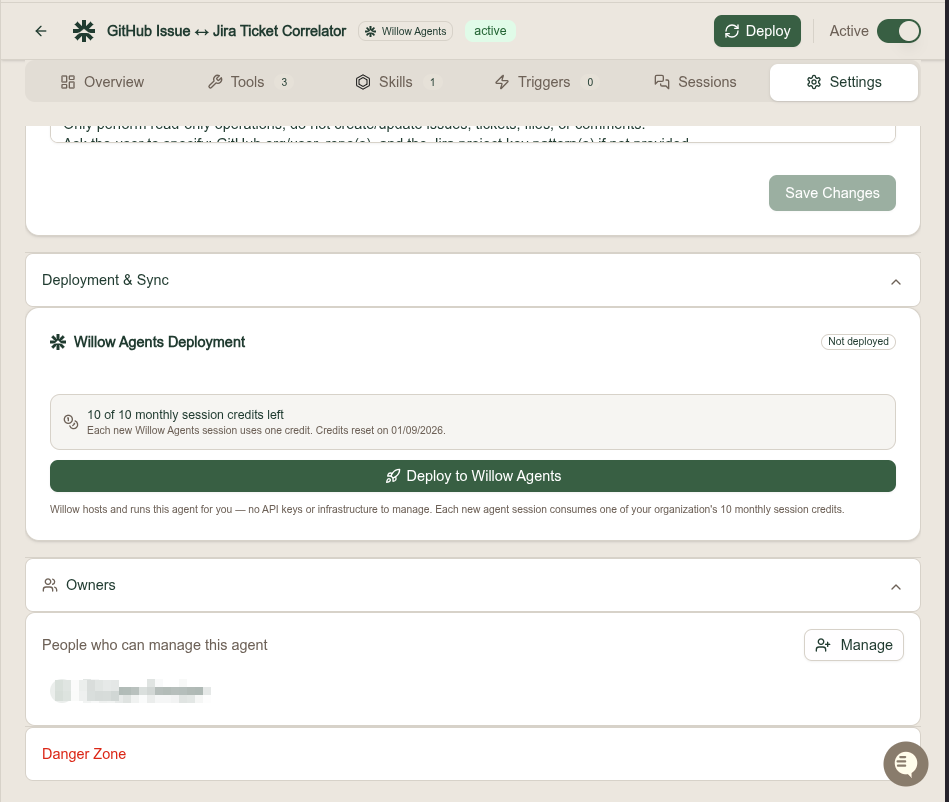
Deploying applies to the platforms that keep an external copy of the agent: Willow Agents, Claude Managed Agents, AWS AgentCore, and custom types you register with Add custom type. On the Custom platform the direction is reversed, so your own harness pulls the agent's configuration from the gateway rather than receiving a push. See Platforms.
Read the deployed state
Deployed state is reported in three places on the Overview tab: a Synced badge, a Version such as v1, and how long ago the deploy happened. Before the first deploy the agent reads Not deployed yet.
The result of the last attempt is recorded in the agent's sync state:
| Field | Description |
|---|---|
| status | synced or error. The whole sync_state is null until the agent's first deploy. |
| external agent ID | The agent's identifier on the external platform. |
| external agent version | The version the platform is running. |
| external agent ARN | Full resource ARN, for the AWS AgentCore harness. |
| MCP server URL | The gateway URL stored on the platform. |
| last synced at | When the last successful sync completed. |
| error | The message from the last failed sync. |
An agent must be synced before it can be invoked.
Deploy through the API
POST /api/background-agents/{id}/sync
The dashboard calls this action Deploy, but the endpoint is still /sync. There is no /deploy route: the button runs the same operation under the older name.
See the Admin API reference for request and response shapes.
What to do next
- Background Agents reference for platforms, statuses, and the detail-page tabs
- Assign Tools to an Agent before you deploy, so the first push carries the full tool set
- Connect AWS AgentCore to deploy onto Amazon Bedrock
- Custom Agents & Self-Hosted Harnesses for the pull-based alternative