Understanding Skills
A skill is a Markdown document that gives your AI instructions, context, or domain knowledge. A skill doesn't call any API or take any action. It's text that gets injected into your AI's context before it starts working. A code review process, a database schema, your team's naming conventions: these are all things that work well as skills.
How skills work
When a skill is active for a connection, your AI reads it automatically before responding. The skill shapes how the AI reasons. Think of it as briefing a colleague on your standards before they start a task.
Your skills vs. admin-published skills
Skills in Willow come from two distinct sources:
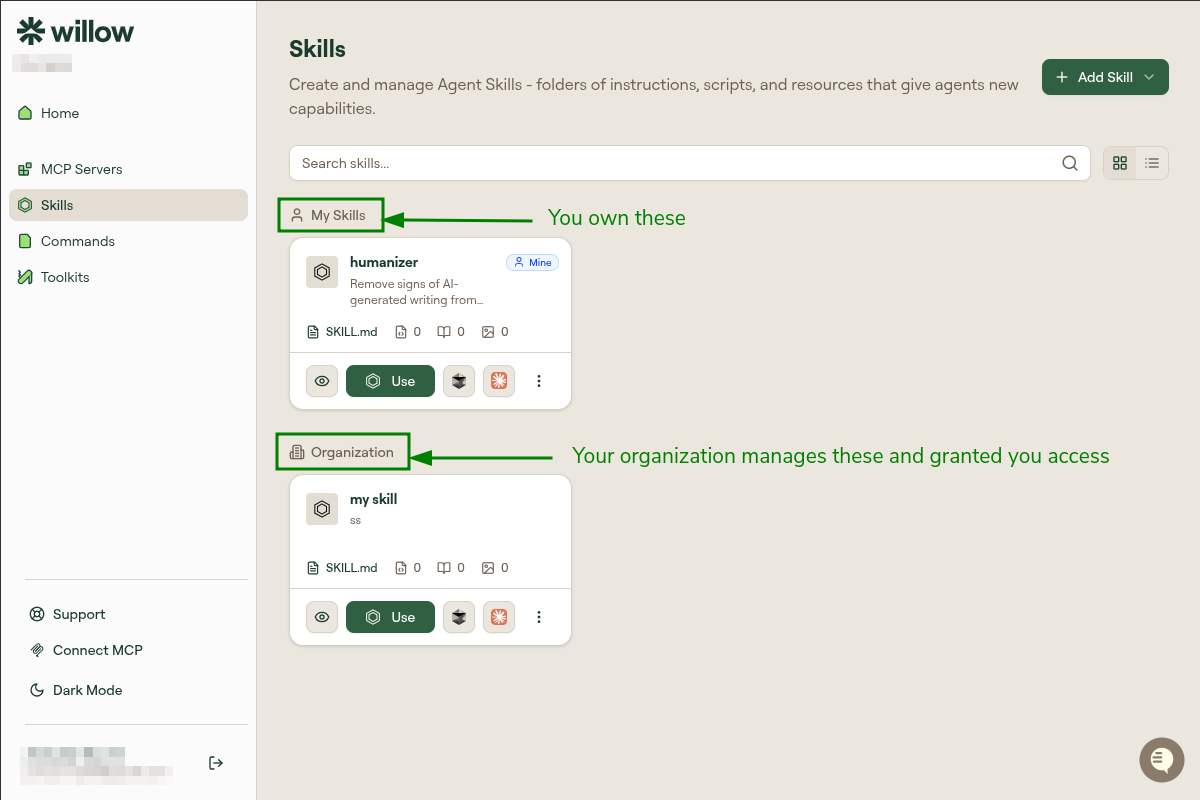
Your skills: You create these on the Skills page. They're personal: only your AI client sees them. They don't appear for your teammates, and creating one doesn't share it with anyone else. If you want to share a skill you've created, ask your admin to publish it to an org-level toolkit.
Admin-published skills: Your admin can publish skills at the org level and assign them to groups. If you're in a group that has org-level skills, those skills are automatically available in your AI client, with no setup needed.
What you see in the Skills section
In Willow's Skills section, you'll see:
- My Skills: Skills you've created yourself
- Org-level sections: Skills your admin has published for your groups, labeled by your admin
If you see skills you didn't create, they're org-level skills assigned to your group. They're available in your AI client automatically.
What personal scope means in practice
Creating a skill does not share it. If you write a "PR Review Process" skill:
- Your AI client picks it up when the skill is included in a connection or toolkit
- Your teammate's AI client doesn't see it
- It won't appear in org-level toolkits unless your admin explicitly publishes it there
This is intentional: personal skills let you customize your workflow without affecting everyone else. When a skill is useful enough to share org-wide, it goes through your admin who publishes it at the org level.
Skill package structure
When you download a skill, it follows a standard package layout:
skill-name/
├── SKILL.md          # Instructions + metadata (required)
├── scripts/          # Executable scripts
├── references/       # Documentation
└── assets/           # Templates, resources
SKILL.md is the main file. It contains YAML frontmatter (name, description, metadata) and a Markdown body with instructions for the AI.
scripts/ contains executable code the AI can run. Scripts should be self-contained and include helpful error messages.
references/ holds additional documentation the AI reads on demand. Keep files focused. The AI loads these only when needed.
assets/ holds static resources: templates, images, data files, and schemas.
When a skill is installed, the AI discovers it by reading its name and description, loads the full SKILL.md when the skill is relevant, and reads scripts, references, and assets only on demand. This keeps context usage efficient.